According to the Joint Commission, communication failures contribute to a significant share of sentinel events in US hospitals. Yet most care teams are still coordinating across three or four disconnected tool—a problem that contributes significantly to communication dysfunction.
This guide reviews 10 TigerConnect competitors, comparing features, pricing, and real-world feedback so you can identify the clinical communication platform that actually fits how your organization works.
Our Top Picks: The Best TigerConnect Alternatives
| Tool |
Best for |
Key strength |
Price |
|
PerfectServe
Top pick
|
Health systems that need scheduling and clinical communication in one platform |
Only platform combining Dynamic Intelligent Routing®, scheduling, and answering service workflows natively |
Custom |
|
Vocera
by Stryker
Wearable
|
Hospitals that need hands-free clinical communication |
Wearable voice communication with secure messaging and alarm integration |
Custom |
|
Spok
Paging
|
Hospitals bridging legacy paging with modern secure messaging |
Nation’s largest paging network with secure messaging and clinical alerts |
Custom |
Why Listen To Us?
PerfectServe has spent nearly 30 years embedded in the operational realities of healthcare communication. Not just building software, but working directly with hospitals and practices to understand where clinical workflows break down. We serve 500+ hospitals and 30,000+ medical practices across the US, which gives us a firsthand view of where competing platforms succeed and where they fall short.
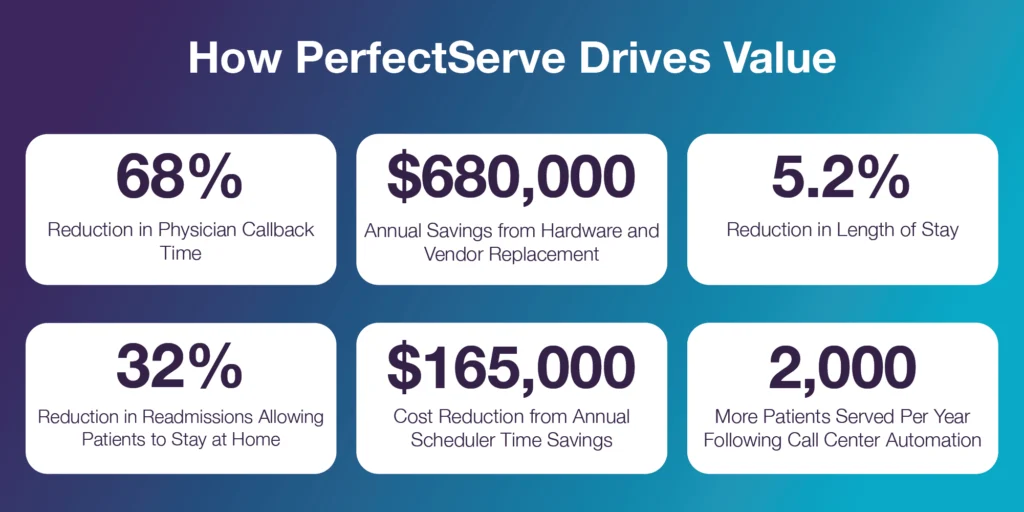
Some of that shows up in our customer outcomes: MemorialCare reported a 68% reduction in call-back time. Allegheny Health Network saw an average 10-minute reduction in door-to-needle times. The University of Tennessee Medical Center reduced the time clinicians spent initiating communication by 76% after embedding PerfectServe in their EHR.
TigerConnect: An Introduction
TigerConnect is a clinical communication platform designed to replace traditional hospital communication methods (overhead pages, phone tag, and disconnected alert systems) with a single, integrated tool. It routes messages by staff role rather than individual name, connects directly to the EHR for patient context, and supports some automated workflows that keep care teams coordinated through each stage of patient care.
TigerConnect recently added an Operator Console solution, though it runs exclusively within Cisco’s infrastructure, which limits its flexibility for organizations with different telephony setups or broader enterprise coordination needs.
Key Features
- Role-Based Messaging: Staff can search and message the right clinician by role, without needing a first or last name.
- AI-Powered Workflow Orchestration (CareConduit): Routes EHR alerts, consults, and AI-generated events to the right role and escalates automatically when a request goes unacknowledged.
- EHR-Integrated Patient Context: Care teams can attach patient records from the EHR directly inside a conversation to reduce errors and speed up decisions.
- Interfacility Transfer Coordination: TigerConnect Transfer handles bed sourcing, transport scheduling, and team communication in one place.
Pros
- Easy to deploy and use, with quick setup across iOS, Android, and desktop.
- Improved communication reliability, with fewer missed alerts and more dependable message delivery.
- 270+ clinical integrations, unifying voice, text, and device alerts in one platform.
- Proven operational results, including faster call-backs, fewer overhead pages, and reduced costs.
Cons
- No ability to tag or mention a specific person inside a group chat, which creates friction around delegated tasks.
- Contract cancellation has been a friction point for some customers, with billing reportedly continuing past stated end dates.
- Performs well in straightforward deployments but loses effectiveness as workflow complexity increases. Organizations with layered scheduling, multi-site coordination, or custom escalation logic tend to outgrow it.
The Comparison Table: Best 10 TigerConnect Competitors
| Tool |
Best for |
Capabilities |
Price |
|
PerfectServe
|
Hospitals that need intelligent clinical communication with superior routing |
Secure messaging, workflow automation, alarm integration, Dynamic Intelligent Routing®, on-call scheduling, operator console, EHR & clinical system integrations |
Custom |
|
symplr Clinical Communications
|
Enterprise health systems |
Secure messaging, workflow automation, care team collaboration, EHR integrations |
Custom |
|
Vocera
by Stryker
|
Hands-free communication in high-acuity or sterile environments |
Voice-enabled communication, secure messaging, alarm integration, care team collaboration |
Custom |
|
Spok
|
Hospitals managing a hybrid paging and modern messaging environment |
Secure messaging, paging integration, clinical alerting, directory management |
Custom |
|
OnPage
|
Hospitals that need reliable clinical alerting and escalation workflows |
Persistent alerting, automated escalation, on-call scheduling, secure messaging, incident management workflows |
Custom |
|
Mobile Heartbeat
|
Mobile-first clinical communication at large health systems |
Secure messaging, voice and video calling, role-based communication, alerts |
Custom |
|
Pulsara
|
EMS-to-hospital coordination and time-critical care |
Real-time care coordination, secure messaging, multi-team communication |
Custom |
|
QliqSOFT
|
Organizations focused on patient engagement alongside internal communication |
AI-powered patient engagement, on-call scheduling, EHR integrations, secure messaging, telehealth |
Custom |
|
Spruce Health
|
Smaller clinics and practices that need unified patient communication |
Secure messaging, voice, video visits, patient communication |
$24/user/mo |
|
Hypercare
|
Teams replacing pagers with modern mobile communication |
Secure messaging, escalations, care team coordination, clinical workflows |
$8/mo |
1. PerfectServe
PerfectServe is a clinical communication and scheduling platform built for hospitals and medical practices that need more than a messaging app. It combines secure messaging, on-call scheduling, and intelligent routing so that messages reach the right clinician automatically — without relying on staff to manually track down who’s on call.
PerfectServe earned two Best in KLAS awards in 2026 in clinical communication and physician scheduling—the only platform to win in both categories.
Key Features
- Dynamic Intelligent Routing®: Messages route automatically to the correct on-call clinician based on real-time schedules, roles, message urgency, and escalation rules with no manual intervention required.
- Secure Clinical Messaging: HIPAA-compliant text, video, and voice communication, with alerts and alarms managed inside one platform.
- Provider Scheduling Integration: Communication connects directly to live provider schedules, so routing updates the moment a schedule changes.
- Operator Console and Call Routing: A cloud-based switchboard lets operators route calls using the clinical directory and real-time schedule visibility (independent of the underlying telephony infrastructure).
Pros
- Consolidates clinical communication and provider scheduling in a single platform, eliminating the manual bridging most organizations do between two separate tools.
- Intelligent routing technology reduces response times and misrouted messages without requiring staff to track schedules themselves.
- Handles complex scheduling scenarios (multi-site, multi-specialty, layered escalation) that simpler platforms struggle with.
- Integrates with 270+ clinical, telecom, and IT solutions.
Cons
- Custom enterprise pricing may be a barrier for smaller organizations.
- Pricing details are not publicly listed and require vendor consultation.
- The initial setup takes longer than lighter-weight tools, given the degree of customization involved.
2. symplr Clinical Communications
symplr Clinical Communications is built for enterprise health systems that need scheduling, messaging, and critical alerts running inside one application. It’s designed to reduce coordination gaps across shifts, settings, and specialties without requiring staff to manage multiple disconnected tools.
Key Features
- Secure Clinical Messaging: HIPAA-compliant messaging for real-time care team collaboration.
- Role-Based Communication: Routes to the correct on-call provider by role and availability.
- Critical Alerts & Notifications: Delivers urgent clinical notifications to the right team members instantly.
- EHR & Hospital System Integration: Connects with electronic health records, nurse call systems, and other hospital technologies.
Pros
- Strong enterprise integration with EHRs and other hospital systems.
- Role-based messaging helps clinicians reach the right person quickly.
Cons
- Implementation and customization may require significant setup time and IT resources.
- Lighter on secondary features compared to some competitors.
- Pricing is not publicly available and requires vendor consultation.
3. Vocera (Stryker)
Vocera (now part of Stryker) is purpose-built for care teams in sterile and high-acuity environments where picking up a phone isn’t practical. Its wearable badge lets clinicians communicate via voice commands mid-procedure, without breaking sterile field or stepping away from a patient.
Key Features
- Hands-Free Voice Communication: Clinicians use voice commands on wearable badges. No smartphone required at the bedside.
- Secure Messaging and Alerts: Secure messages, voice calls, and clinical alerts across one compliant platform.
- Clinical System Integration: Connects with EHRs and hospital systems to surface patient context on clinician devices.
- Role-Based Communication: Reach colleagues by role, group, or name without a directory lookup.
Pros
- Hands-free communication improves mobility and efficiency in OR and ICU environments.
- Strong integration with hospital and alert systems.
Cons
- Hardware devices increase deployment and maintenance costs compared to software-only platforms.
- Staff training and adoption can be a challenge, particularly in facilities with mixed device environments.
- Most Vocera deployments are badge-only and limit flexibility for teams that also need smartphone-based communication.
4. Spok
Spok is built for hospitals that haven’t fully moved away from paging and may not need to. It runs a nationwide paging network alongside modern secure messaging, making it a practical option for facilities managing a hybrid communication environment rather than a clean migration to cloud-based tools.
Key Features
- Critical Alerting Workflows: Routes code notifications, lab results, and emergency messages to the right care team member.
- Secure Clinical Messaging: HIPAA-compliant messaging across departments.
- Centralized Clinical Directory: Hospital-wide directory for finding and reaching any clinician or department.
- Paging Network Support: Spok’s own nationwide paging network operates independently of cellular or Wi-Fi, which matters in areas with unreliable connectivity.
Pros
- Highly reliable alerting and paging infrastructure for hospitals with legacy dependencies.
- Comprehensive directory for quickly locating clinicians across a large facility.
Cons
- Interface feels dated compared to more modern platforms.
- Spok has an on-prem secure messaging setup, which adds infrastructure overhead and ongoing IT resources to maintain.
- Integration with newer clinical systems can require meaningful IT involvement.
5. OnPage
OnPage is focused on a specific problem: making sure urgent clinical alerts don’t get missed. Where most secure messaging platforms send a notification and move on, OnPage uses persistent, escalating alerts that keep going until someone acknowledges them. This is a meaningful distinction in time-sensitive care environments.
Key Features
- Secure, HIPAA-Compliant Messaging: Encrypted communication with read receipts and audit trails.
- Priority-Based Alerting & Escalation: Persistent alerts with automated escalation chains.
- On-Call Scheduling & Alert Routing: Routes messages to the right clinician based on live schedules.
- Incident Reporting & Analytics: Tracks alerts, response times, and communication performance.
Pros
- “Alert-until-read” notifications significantly reduce the risk of missed critical messages.
- EHR and tool integrations deliver contextual, workflow-driven alerts rather than generic pings.
Cons
- Stronger at alerting than at broader internal clinical communication workflows.
- Advanced hospital coordination features are limited compared to full-scale platforms.
- Some users have reported reliability issues with notification sounds in certain environments, which can undercut the core value proposition.
6. Mobile Heartbeat
Mobile Heartbeat‘s MH-CURE platform serves 300,000+ monthly active users at major US health systems, running on Microsoft Azure. It consolidates messaging, voice, alerts, and live patient context inside one application without requiring staff to switch between tools mid-workflow.
Key Features
- Unified Clinical Communication Platform: Messaging, voice, alerts, and clinical data in one application.
- Secure Messaging and Voice: Clinicians message and call without switching apps.
- Real-Time Alerts and Notifications: Urgent notifications reach the assigned team member directly.
- Healthcare System Integrations: Connects with hospital systems to surface patient context inside communication workflows.
Pros
- Comprehensive mobile communication platform with strong clinical integrations.
- Handles the full range of hospital communication needs inside one application.
Cons
- Implementation and integration can require significant IT resources.
- Might be more than smaller practices need.
- Mobile Heartbeat is wholly owned by HCA Healthcare, which may limit its availability, roadmap priorities, and support responsiveness for organizations outside the HCA network.
7. Pulsara
Pulsara is built specifically for time-critical care coordination, particularly the handoff between EMS and the hospital. Rather than general clinical communication, it creates a dedicated case channel for each patient that EMS, ED teams, and specialists can all work from simultaneously, before the patient even arrives.
Key Features
- Unified Patient Communication Channel: Each patient gets a dedicated case channel with a shared view across all teams.
- Real-Time Messaging and Multimedia Sharing: Clinicians share messages, images, ECGs, and live video inside the platform. Clinical decisions move faster with full context available.
- EMS-to-Hospital Coordination: Paramedics open a patient case before hospital arrival so care teams can prepare.
- Time-Sensitive Alerts and Workflow Tracking: Case timelines, alerts, and performance data sit inside one dashboard.
Pros
- Genuinely strong for emergency and time-critical care workflows. This is the use case it was built for.
- Connects EMS, hospitals, and specialists on one shared platform in a way most general-purpose tools don’t.
Cons
- Designed primarily for incident-driven acute care, not day-to-day clinical communication.
- Less mature and less broadly deployed than most other platforms on this list.
- Pricing and plan details are not publicly listed.
8. QliqSOFT
In a combination that’s less common for this category, QliqSOFT combines clinical team communication with patient-facing engagement tools. For organizations that want to handle both internal coordination and patient follow-up inside one platform, it covers more ground than most solutions.
Key Features
- HIPAA-Compliant Secure Messaging: Encrypted text, voice, and video communication for care team communication.
- On-Call Scheduling: View and manage schedules with communication routing based on availability.
- AI-Powered Patient Engagement: Chatbots automate patient intake, follow-ups, and more routine communication workflows.
- Telehealth & Virtual Visits: Video consultations within the same platform used for daily messaging.
Pros
- Useful for organizations that want clinical communication and patient engagement handled in one place rather than two.
- HIPAA-compliant across both internal and patient-facing workflows.
Cons
- Less depth on clinical routing and escalation compared to platforms built specifically for internal hospital communication.
- AI chatbot features require meaningful setup and customization to work well.
- Pricing is not transparent and requires vendor consultation.
9. Spruce Health
Spruce Health is designed for clinics and smaller practices that need a unified communication system without the complexity of an enterprise platform. It brings phone, SMS, secure messaging, and telehealth under one roof, which is genuinely useful for practices that currently stitch those functions together from separate vendors.
Key Features
- Unified Communication Platform: Phone, SMS, secure messaging, and telehealth in one application.
- Secure Messaging and File Sharing: Clinicians and patients exchange messages, images, and documents inside one thread.
- Integrated Medical Phone System: Call routing, voicemail transcription, and multiple lines built in, meaning no separate phone vendor is needed.
- Telehealth and Video Visits: Secure video consultations from the same platform used for daily messaging.
Pros
- Well-suited for practices that want to eliminate multiple communication vendors.
- Handles both patient-facing and internal communication in one tool.
Cons
- Designed mainly for clinics and smaller practices, not hospital-level communication. Complexity scales poorly beyond clinic use cases.
- Integration with external clinical systems can be limited.
- Pricing is transparent (starting at $24/user/month), but costs can add up quickly for larger teams.
10. Hypercare
Hypercare is a cloud-based clinical communication platform positioned as a pager replacement for hospital teams. It handles secure messaging, on-call scheduling, and code activation workflows, which are the core functions hospitals need when moving away from legacy paging infrastructure.
Key Features
- Secure Clinical Messaging: Encrypted messaging for patient care updates across the care team.
- On-Call Scheduling Integration: Provider schedules are visible directly within the communication platform.
- Code Activation and Alerts: Urgent clinical alerts for emergencies and time-sensitive clinical events.
- Pager Replacement Solution: Mobile communication tools designed to replicate and improve on what pagers do.
Pros
- Purpose-built for hospital communication workflows, not adapted from a general-purpose messaging tool.
- Practical entry point for hospitals looking to retire pager infrastructure without a major platform overhaul.
Cons
- Full functionality requires integration with existing hospital systems, which adds implementation complexity and cost.
- Rollout at large healthcare networks may take time.
- Limited number of public reviews and feedback, making it harder to evaluate performance at scale.
Why Healthcare Teams Are Switching to PerfectServe
Secure messaging solves one layer of the problem. Scheduling solves another. But organizations running both on separate platforms are still asking care teams to manually bridge the gap between two critical functions. That gap is where delays and misrouted messages live.
PerfectServe eliminates it at the architectural level. Clinical communication with intelligent routing, provider scheduling, and an after-hours answering service all operate in one unified platform.
The difference is especially visible in operator console workflows. TigerConnect’s operator console runs inside a widget tied exclusively to Cisco’s infrastructure. This is useful if you’re already a Cisco shop, but it’s limiting if your telephony setup changes or if you need workflows that extend beyond the contact center. PerfectServe’s cloud-based switchboard sits above your telephony layer entirely, which means operator workflows survive infrastructure changes and can scale into broader enterprise care coordination.
The right question when evaluating TigerConnect alternatives isn’t which platform has the most features—it’s which platform requires the least manual work from your care teams to do what clinical communication should do by default.
Thinking of exploring a new clinical communication tool? Visit PerfectServe to request a demo.
Commonly Asked Questions By HealthCare Organizations
What is the best TigerConnect alternative for large health systems? 

For most large health systems, PerfectServe is the strongest alternative because it’s the only platform that natively combines physician scheduling, secure messaging, switchboard functionality, after-hours call management, and rule-based intelligent routing. That said, organizations in high-acuity, hands-free environments (ORs, ICUs) may find Vocera worth evaluating for its wearable communication capabilities. The right choice depends on where your largest operational gap sits.
What separates PerfectServe from every other platform on this list?
The clearest differentiator is that PerfectServe’s scheduling and communication systems share the same underlying data. When a schedule changes, routing updates automatically. That means no manual intervention, no lag, no staff member chasing down who’s actually on call. Most platforms on this list handle either scheduling or communication well. PerfectServe is built so the two functions inform each other in real time.
What should hospitals look for in a TigerConnect alternative?
The right platform depends on where your largest operational gap sits. Three things are worth evaluating carefully:
1. How the platform identifies the correct on-call provider at any given moment
2. How quickly routing updates when a schedule changes
3. Whether scheduling and messaging operate from the same system or require manual coordination between two separate tools
If those three things work seamlessly, most of the downstream communication problems take care of themselves.

 Clinical Communication & Collaboration
 Medical Answering Service
 Provider & Staff Scheduling
 Healthcare Operator Console
 Integrations
 Features








 Organizations
 Roles
Roles
 Blogs
Blogs News
News Comparisons
 Case Studies
 Downloads/Reports
 Events
 Videos
 Company
 Careers
 Why PerfectServe
 FAQ
FAQ Nurses of Note
 Best in KLAS