




How to Evaluate a Healthcare Operator Console: A Buyer’s Guide
Operator consoles are not created equally. Use this scorecard to evaluate each solution to understand what a console designed for healthcare should do for your organization.

Your operators are the front door of your contact center. Today, the average contact center has over 50 operators handling inbound calls, patient transfers, codes, and message escalation.1
The trouble is, technology hasn't kept pace. Operators are stuck juggling siloed systems. The average tech stack includes 5 or more technologies, from scheduling software to clinical communication tools to phone and PBX systems.
That's not a knock on the stack you've built over the years. Most leaders simply don't know purpose-built alternatives exist. In fact, only 15% of contact center leaders want to stay with their current vendor. 1
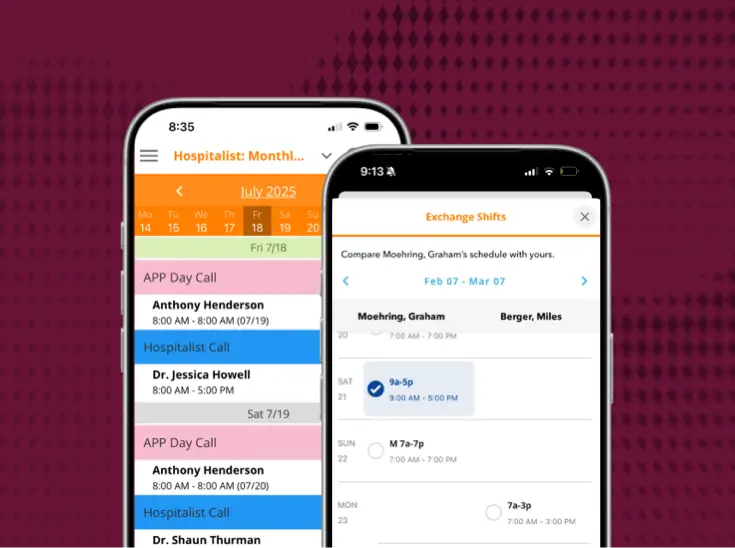
Despite that friction, 63% say reducing operator workload alone would justify a new investment. 1 If you're in the market for a modern operator console, this guide gives you a framework: 8 categories to consider, the differentiators worth knowing, and a few honest caveats other guides miss.
8 Categories to Evaluate a Healthcare Operator Console
Operator consoles are not created equally, even though most vendors will tell you their tools does it all. Having a scorecard to evaluate their claims allows you to understand what a console designed for healthcare orgs should do.
When evaluating operator consoles, review these capabilities and ask vendors these questions:
1. Call management: Can operators see queues, parked calls, active calls, and history in one place, or are they toggling between screens?
2. On-call and scheduling: Does the on-call schedule update in real time and connect to the console, or does someone update a spreadsheet and hope an operator sees it?
3. Messaging: Does the console support bidirectional messaging with read receipts?
4. EHR and clinical integrations: What integrations are available, and can the console integrate with my existing tech stack? (Make sure integrations are deep, contextual data and not a surface level connection.)
5. Deployment model: Does the console work on the cloud, on-premise, or hybrid? (And just as important, what does that mean for the telephony you already have?)
6. Security: How is PHI handled inside the console, and what access controls are in place for operators who see sensitive information all day?
7. Analytics: Can you see call volume, queue performance, and staffing gaps in real time, or only after someone builds a report?
8. User experience: How long does it take to train a new operator? A console that takes weeks to learn will show up in your turnover numbers.
Key Differentiators of Modern Healthcare Call Center Consoles
While every item on the scorecard matters, they don’t all carry equal weight. There are 6 key capabilities that separate legacy console software from modern ones.
PBX-agnostic healthcare call center
You shouldn't have to rip out your existing telephony to modernize your console. A console that works with the PBX you already have gets you to a better tool without a disruptive, expensive teardown.
Single-click emergency orchestration
When a STEMI, stroke, or code blue comes in, every second counts for that patient. A modern console allows an operator to activate the right response team in one click, rather than looking up a list and calling each person. That can shave critical time off a response, and can be a powerful tool for other emergencies like a weather alert or active shooter.
Cloud-native, no lock-in
The cloud offers more than a reduction in or elimination of hardware. A true cloud-native console should let you scale, update, and adapt without being tied to one vendor's infrastructure indefinitely.
Two-way messaging with read receipts
"Wait and see" isn't good enough for clinical communication, and message delivery can no longer rely on who is working that day or the historical knowledge of your operators. Read receipts grant a sense of security because you know the message was received, not just sent.
Provider self-service schedule swaps
Stale on-call schedules are one of the most common causes of misrouted calls. When providers can update their own availability in real time, the schedule the operator sees is the schedule that's actually true.
Work-from-anywhere for operators
A cloud-based console doesn't tie operators to a physical call center. That means you can hire outside your local market, keep staff working during weather emergencies or facility issues, and reduce turnover by offering remote flexibility.
The Deployment Question, Answered Honestly
Most health systems aren't starting from a blank slate. In fact, 68% still run hybrid or on-prem telephony, and 67% call AI-enabled routing critical to their strategy, meaning most buyers want modern capability but are working against infrastructure that makes getting there harder. 1
So, if a vendor's answer to modernizing is "rip out everything you have," that's a red flag. The honest answer is a cloud-native console that layers onto the telephony you already have.
This matters beyond the work and cost that goes into "starting over" for your hospital's call center. When communication breaks down and you need to understand how a call was routed, someone is held responsible, even if routing logic was never actually designed. That logic has likely accumulated over many years, and it might even depend on which operator is working that day.
That's not a call out, and it isn't a failure of your team's judgment. Most consoles were built to handle calls and rely on operators to reliably route those calls. That was a technology limitation, but it no longer has to be.
Deploying a modern console closes that gap without adding to the IT maintenance burden 85% of leaders already report as moderate to very high, and the right vendor will be able to accommodate integration with many of your existing solutions.1 That's why it's essential to find a solution that:
- Connects clinicians, operators, and care teams under one unified workflow
- Supports rapid call escalation and code activation
- Gives operators patient-aware context during call handling
These capabilities aren't just nice-to-have selling points. They are real, modern workflow improvements that give your operators the tools they need to handle calls faster and more efficiently without adding more complexity to their shift.
The Cost of Not Switching to a Modern Operator Console
Staying with a legacy console feels like the safer, lower-risk choice. The data says otherwise.
According to Gartner, IT downtime in the contact center costs an average of $5,600 per minute,2 and 85% of healthcare IT and operations leaders report a moderate to very high maintenance burden just keeping their current stack running.1 That's budget and attention spent maintaining what you have. Can you afford to keep up with that loss?
The patient-experience cost is just as real. 53% of leaders say long wait times are still hurting the patient experience, and 44% cite multiple transfers, even though 83% report hitting their own speed-to-answer targets. 1 While the metrics can look fine, the experience underneath them isn't.
That gap compounds in different ways: 84% of leaders say technology gaps directly affect their ability to recruit, train, and retain operators. 1 Every year you stay on outdated infrastructure is a technology and staffing cost, and healthcare contact centers are already short-staffed.
Finding the Right Fit
Finding the right operator console isn't about chasing every feature on a spec sheet. Some capabilities are more essential than others, and most importantly, the features that matter the most are the ones that close the gaps that cost you today.
Ready to compare vendors directly? See how PerfectServe, Spok, and Amtelco stack up against the categories in this guide, or schedule a demo today of PerfectServe’s Operator Console to see how it can empower your operators to deliver faster care communication.
See it working for real teams





.jpg)



.png)




Bring us the workflow that [hurts most]
We'll show you how it runs on PerfectServe, with your teams, your sites and your EHR.