






You shouldn't have to [rebuild the schedule] every time something changes
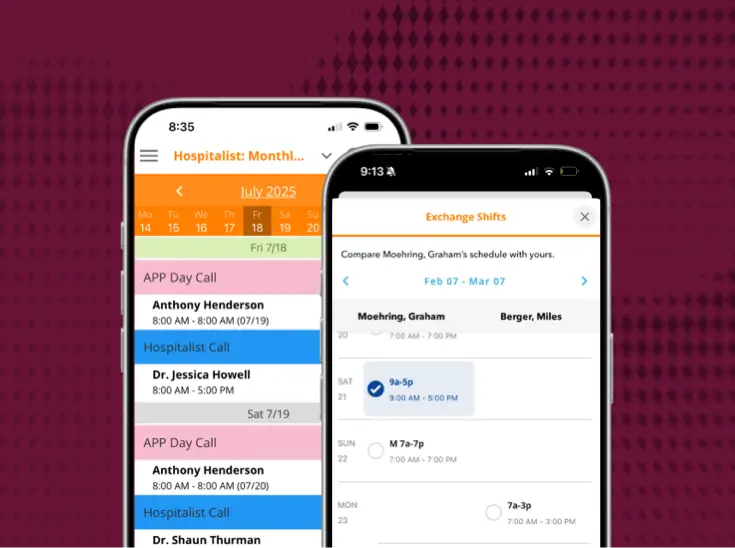
Lightning Bolt Clinical Team Scheduling builds clinicians' schedules around real coverage needs, rules, and preferences, so you can plan ahead and make changes without starting over.

Saving time and scaling to fit any organization
Lightning Bolt eliminates manual work and makes it possible to manage schedules at scale.


6 things that stop happening to schedulers
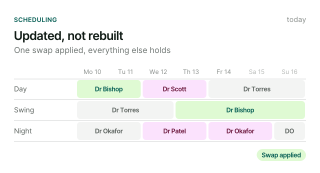
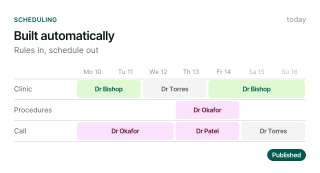
The schedule stops getting rebuilt from scratch

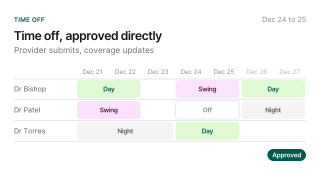
Time-off requests stop landing only on you

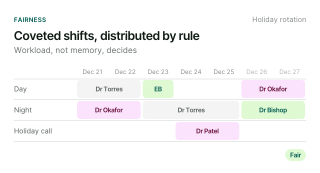
Favoritism complaints stop

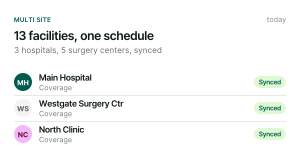
Multi-site coverage stops needing its own spreadsheet

Firefighting stops being the plan

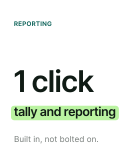
Reporting stops eating your afternoon

Where this lives in the platform
Lightning Bolt Clinical Team Scheduling

It holds up against real schedules
2 non-acute groups, different kinds of complexity, 1 platform.



The rollout is done with you

Guided from day one

Built to expand with you

Support that stays
What schedulers ask first
What separates PerfectServe from other platforms on the market?
The clearest differentiator is that PerfectServe’s scheduling and communication systems share the same underlying data. When a schedule changes, routing updates automatically. That means no manual intervention, no lag, no staff member chasing down who’s actually on call. Most platforms on the market either scheduling or communication well. PerfectServe is built so the two functions inform each other in real time.
What results have PerfectServe customers seen?
Advocate Good Samaritan Hospital reported a 99% decrease in overhead physician pages, Hospital for Special Surgery cut rapid response times 73% (2:30 → 40 sec), and Munson Healthcare’s 7-hospital system retired 600 pagers (~$120K/yr saved) and cut 56,000 calls over 13 months.
How much does PerfectServe cost?
PerfectServe uses custom pricing based on organization size and the solutions you need, such as clinical communication, scheduling, operator console, or medical answering service. Request a demo for a quote tailored to your environment.
Can PerfectServe replace our pagers?
Yes. PerfectServe runs on the devices teams already use (smartphones, desktops, and VoIP phones) and can work alongside legacy pagers during a transition rather than forcing an overnight switch. Organizations commonly use it to retire pager fleets while keeping critical alerts reliable.
Does PerfectServe integrate with our EHR and existing systems?
Yes. PerfectServe integrates with Epic, Oracle Health (Cerner), and 270+ clinical systems, including nurse call and alerting platforms, lab and radiology systems, telephony providers, and pager networks. Messaging can be embedded directly in the EHR, so patient context travels with every on-call message and clinicians don’t switch between applications.
Is clinical communication software only for large hospitals?
No. The best platforms can scale from single-specialty clinics to large health systems. PerfectServe serves both 500+ hospitals and 10,000+ medical practices, using the same routing engine for acute and post-acute care settings.
Is PerfectServe HIPAA-compliant and secure?
Yes. PerfectServe is HIPAA compliant and SOC 2 compliant. Messages are encrypted at rest and in flight, every action is captured in a complete audit trail, and every covered entity receives a signed Business Associate Addendum before going live. See how we make trust and security a priority.
How long does a demo take?
A demo with PerfectServe typically lasts about 20-30 minutes. Schedule one now to see how our solutions can benefit your organization.
Don’t have time? Take a product tour of our solutions.
Do I need a special device to use PerfectServe?
No. PerfectServe works on your legacy devices, smartphones (including both BYOD and shared device models), VoIP and landline phones, desktops, and even pagers. No proprietary devices are required.
How much time will this realistically save our team?
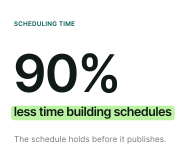
We've seen time savings upwards of 90%, and it's not unusual for our clients to see time savings in that 80% - 90% block depending on what their scheduling protocols look like. This could mean hours to weeks for some schedulers.
How is Lightning Bolt different from the spreadsheet or generic tool we use now?
Generic tools and spreadsheets weren't built for the realities of physician scheduling: juggling individual provider needs, multi-site coverage, and constant last-minute changes. Lightning Bolt is purpose-built for that complexity, so the schedule doesn't have to be manually rebuilt every time something shifts.
What happens when a provider requests time off?
Providers submit time-off requests in the platform, and approved time off is automatically updated on the schedule.
What if our rules change after the initial setup?
We offer unlimited professional services and technical support to help you adapt the system to new rules, whether you prefer us to handle it or do it yourself.�
Will Lightning Bolt set up the scheduling rules, or can I?
We assist with initial setup and training. Users can choose to maintain the system themselves or rely on our support. If the rules change, we can also handle it or you can do it yourself.
How do you make sure my on-call schedule is fair?
Lightning Bolt builds every schedule from your group's coverage rules, time-off requests, and shift preferences.
Is there a limit on the number of providers or shifts the system can schedule?
No, our system can handle schedules for large groups with no technical limits on providers or tasks.
Can the system be initialized with tallies from past data?
Yes, either by loading actual past schedules or summaries in the form of tallies to produce new schedules based on historical data.�
How is it priced?
By the unit that scales with each product: operators for Operator Console, hospital beds for Clinical Communication, and people scheduled for Lightning Bolt Clinical Team Scheduling. Acute agreements are packaged to the organization, so a consultant will scope pricing on the discovery call.
How long does a demo take?
A demo with PerfectServe typically lasts about 20-30 minutes. Schedule one now to see how our solutions can benefit your organization.
Don’t have time? Take a product tour of our solutions.

Bring this to [your practice]
A working session built around the schedule you actually run, not a generic walkthrough.