




Frequently asked questions
Have a question about something else? Get started with a personalized demo.
The basics
What separates PerfectServe from other platforms on the market?
The clearest differentiator is that PerfectServe’s scheduling and communication systems share the same underlying data. When a schedule changes, routing updates automatically. That means no manual intervention, no lag, no staff member chasing down who’s actually on call. Most platforms on the market either scheduling or communication well. PerfectServe is built so the two functions inform each other in real time.
What results have PerfectServe customers seen?
Advocate Good Samaritan Hospital reported a 99% decrease in overhead physician pages, Hospital for Special Surgery cut rapid response times 73% (2:30 → 40 sec), and Munson Healthcare’s 7-hospital system retired 600 pagers (~$120K/yr saved) and cut 56,000 calls over 13 months.
How much does PerfectServe cost?
PerfectServe uses custom pricing based on organization size and the solutions you need, such as clinical communication, scheduling, operator console, or medical answering service. Request a demo for a quote tailored to your environment.
Can PerfectServe replace our pagers?
Yes. PerfectServe runs on the devices teams already use (smartphones, desktops, and VoIP phones) and can work alongside legacy pagers during a transition rather than forcing an overnight switch. Organizations commonly use it to retire pager fleets while keeping critical alerts reliable.
Does PerfectServe integrate with our EHR and existing systems?
Yes. PerfectServe integrates with Epic, Oracle Health (Cerner), and 270+ clinical systems, including nurse call and alerting platforms, lab and radiology systems, telephony providers, and pager networks. Messaging can be embedded directly in the EHR, so patient context travels with every on-call message and clinicians don’t switch between applications.
Is clinical communication software only for large hospitals?
No. The best platforms can scale from single-specialty clinics to large health systems. PerfectServe serves both 500+ hospitals and 10,000+ medical practices, using the same routing engine for acute and post-acute care settings.
Is PerfectServe HIPAA-compliant and secure?
Yes. PerfectServe is HIPAA compliant and SOC 2 compliant. Messages are encrypted at rest and in flight, every action is captured in a complete audit trail, and every covered entity receives a signed Business Associate Addendum before going live. See how we make trust and security a priority.
How long does a demo take?
A demo with PerfectServe typically lasts about 20-30 minutes. Schedule one now to see how our solutions can benefit your organization.
Don’t have time? Take a product tour of our solutions.
Do I need a special device to use PerfectServe?
No. PerfectServe works on your legacy devices, smartphones (including both BYOD and shared device models), VoIP and landline phones, desktops, and even pagers. No proprietary devices are required.
What is PerfectServe?
PerfectServe is a leading provider of technology that helps healthcare organizations communicate, coordinate real-time care delivery, and schedule their most valuable assets, including people, rooms, and even equipment. With our clinical communication, physician scheduling, operator console, and medical answering service solutions, we help our customers accelerate speed to care by ensuring the right people are in place at the right time to take action on important information related to patient care.
Provider Scheduling
What happens when the on-call schedule changes?
Lightning Bolt updates the schedule directly, and Intelligent Answering reads that same schedule, so a same-day swap doesn't need a separate update.
Is Lightning Bolt only for large groups, or can it help small practices?
Yes, it can help smaller practices! Many of our smaller practices find having Lightning Bolt to be very beneficial. It gives them one source of truth for scheduling, makes it much easier to submit time-off requests & execute last-minute shift swaps, creates optimal holiday schedules, allows for easy mobile schedule access, and promotes an overall increase in convenience.
Is there a limit on the number of providers or shifts the system can schedule?
No, our system can handle schedules for large groups with no technical limits on providers or tasks.
What if our rules change after the initial setup?
We offer unlimited professional services and technical support to help you adapt the system to new rules, whether you prefer us to handle it or do it yourself.�
Will Lightning Bolt set up the scheduling rules, or can I?
We assist with initial setup and training. Users can choose to maintain the system themselves or rely on our support. If the rules change, we can also handle it or you can do it yourself.
Can the system be initialized with tallies from past data?
Yes, either by loading actual past schedules or summaries in the form of tallies to produce new schedules based on historical data.�
What happens when a provider requests time off?
Providers submit time-off requests in the platform, and approved time off is automatically updated on the schedule.
How much time will this realistically save our team?
We've seen time savings upwards of 90%, and it's not unusual for our clients to see time savings in that 80% - 90% block depending on what their scheduling protocols look like. This could mean hours to weeks for some schedulers.
Can the system schedule nurses, technicians, or physician assistants (PAs)?
Yes, our system is flexible enough to schedule any staff.
How is Lightning Bolt different from the spreadsheet or generic tool we use now?
Generic tools and spreadsheets weren't built for the realities of physician scheduling: juggling individual provider needs, multi-site coverage, and constant last-minute changes. Lightning Bolt is purpose-built for that complexity, so the schedule doesn't have to be manually rebuilt every time something shifts.
How is it priced?
By the unit that scales with each product: operators for Operator Console, hospital beds for Clinical Communication, and people scheduled for Lightning Bolt Clinical Team Scheduling. Acute agreements are packaged to the organization, so a consultant will scope pricing on the discovery call.
Does Lightning Bolt require custom development to work with Epic or Oracle?
No. Lightning Bolt offers certified Epic and Oracle integration depth confirmed before procurement, so integration scope is known up front rather than discovered mid-project.
How do you make sure my on-call schedule is fair?
Lightning Bolt builds every schedule from your group's coverage rules, time-off requests, and shift preferences.
Which RHT strategic goals does PerfectServe support?
PerfectServe supports Technology Innovation (cloud-based communication and scheduling infrastructure), Workforce Development (scheduling tools that reduce burnout and improve retention), Sustainable Access (operator console and patient engagement tools that extend care reach), and Innovative Care Models (integrated communication workflows that enable team-based and virtual care).
Does PerfectServe qualify for RHT funding?
PerfectServe's clinical communication, physician scheduling, operator console, and patient engagement solutions align with the RHT program's technology innovation, workforce development, sustainable access, and innovative care goals. Qualification is determined at the state level based on your facility's approved transformation plan, but PerfectServe's product suite is designed to meet the criteria these plans prioritize.
How does Lightning Bolt use artificial intelligence (AI), and how does this differentiate it from other products on the market?
Unlike other products that simply digitize manual scheduling or automate schedule builds, Lightning Bolt uses an AI-enabled process called combinatorial optimization to identify the BEST schedule from a finite set of possibilities. By considering multiple variables such as staff availability, skill sets, and shift preferences, combinatorial optimization allows Lightning Bolt to rapidly auto-generate an optimal schedule that makes the best use of resources and meets organizational constraints. This process advances operational efficiency, improves staff satisfaction by building fairer schedules, and enhances patient care by ensuring that the right personnel are in the right place at the right time.
Can the system schedule APPs, nurses, technicians, or other staff?
Yes! Lightning Bolt is designed to schedule all types of healthcare staff, including advanced practice providers, nurses, and technicians. The system can handle different scheduling rules, shift patterns, and certification requirements for each role, making it ideal for comprehensive staff management.
I already use another system for scheduling and load it into PerfectServe, why would I need to switch?
While basic integration with other scheduling systems is possible, Lightning Bolt offers real-time synchronization (under one minute) that eliminates manual uploads and potential errors. Our AI-powered optimization creates more efficient schedules while respecting provider preferences, reducing administrative burden, and improving provider satisfaction—benefits that simply aren’t possible with disconnected systems.
How will the scheduling solution improve our patient experience beyond what the answering service already provides?
Accurate call routing depends entirely on provider scheduling data. With Lightning Bolt, you can build schedules up to a year in advance, allowing patients to schedule follow-up appointments months ahead without having to call back later. This eliminates the need for office staff to maintain callback lists when provider schedules become available, significantly improving patient satisfaction and reducing scheduling delays.
How much time will my staff save by using both solutions together?
While ROI varies by practice, our clients consistently report a significant reduction in schedule creation and management time. Consider the hours your team currently spends building schedules, balancing assignments, and incorporating last-minute changes—Lightning Bolt automates these tasks, potentially saving your staff countless hours each week. What could your team accomplish with that extra time?
What additional benefits do I get by combining both services?
By combining services, you’ll benefit from faster syncs (under one minute), unified provider data management, streamlined communication pathways, and consolidated support. The integrated solution eliminates data discrepancies between scheduling and your answering service, ensuring patients always reach the right provider at the right time.
Will switching to your scheduling solution disrupt our current workflows?
No. Our implementation team specializes in minimal disruption transitions. We migrate your existing schedules, rules, and preferences into the new system while maintaining your current operations. Most customers experience no service interruption, with a smooth transition that enhances rather than disrupts established workflows.
How does PerfectServe Lightning Bolt Scheduling integrate with my current answering service?
PerfectServe Lightning Bolt Scheduling seamlessly integrates with your existing answering service, providing real-time schedule updates that sync within one minute. This integration ensures your answering service always has the most current on-call information, reducing errors and improving communication efficiency.
What interfaces does your system integrate with?
EHR, pager, SMS, clinical communication system, provider schedules, nurse call, hospital phone system, PSTN, and overhead paging that are included out of the box to reduce setup time and integration costs.
What information can be viewed within the console?
The console provides access to call queues, active calls, parked callers, call history, codes, PHI, shared directory, schedules, and information on who's currently on call within the organization.
What is the shared directory of users and providers?
The shared clinical directory allows for easy access to contact information for locations, clinicians, on-call providers, response teams, and patients to reduce time-consuming searches for operators.
What should hospitals look for in a TigerConnect alternative?
The right platform depends on where your largest operational gap sits. Three things are worth evaluating carefully:1. How the platform identifies the correct on-call provider at any given moment2. How quickly routing updates when a schedule changes3. Whether scheduling and messaging operate from the same system or require manual coordination between two separate toolsIf those three things work seamlessly, most of the downstream communication problems take care of themselves.
What separates PerfectServe from other platforms on the market?
The clearest differentiator is that PerfectServe’s scheduling and communication systems share the same underlying data. When a schedule changes, routing updates automatically. That means no manual intervention, no lag, no staff member chasing down who’s actually on call. Most platforms on the market either scheduling or communication well. PerfectServe is built so the two functions inform each other in real time.
What is the best TigerConnect alternative for large health systems?
For most large health systems, PerfectServe is the strongest alternative because it’s the only platform that natively combines physician scheduling, secure messaging, switchboard functionality, after-hours call management, and rule-based intelligent routing. That said, organizations in high-acuity, hands-free environments (ORs, ICUs) may find Vocera worth evaluating for its wearable communication capabilities. The right choice depends on where your largest operational gap sits.
How is PerfectServe different from Spok?
Spok’s operator console is a CTI layer on top of on-prem PBX hardware, which ties operators to on-site infrastructure. PerfectServe sits above the telephony layer via SIP, runs in the cloud at 99.99% uptime, and auto-routes calls to the right on-call provider using live schedule data.
What is the best operator console for hospitals in 2026?
PerfectServe is the most comprehensive option for most health systems because it’s the only platform in this comparison that is telephony-agnostic and cloud-native while unifying automated routing, live on-call scheduling, and real-time EHR data in a single console. Amtelco suits teams wanting deep scripting control and Spok fits organizations still anchored to legacy paging.
Is scheduling software enough, or do hospitals need clinical communication too?
Scheduling software by itself can solve coverage planning, but it doesn’t close the loop on care coordination. When a physician’s schedule changes in real time (a no-show, an emergent case, a shift swap) the communication layer needs to know immediately. Without that connection, messages still go to the wrong person and on-call routing lags behind reality. Health systems that have integrated scheduling and communication report measurably faster response times and fewer coordination errors. For organizations managing complex call coverage across multiple departments and/or locations, a unified platform is worth serious consideration over a scheduling-only tool.
Does QGenda integrate with clinical communication platforms?
If you need more than QGenda’s basic messaging functionality, QGenda does integrate with several third-party communication platforms. However, integrations introduce latency and data sync dependencies, which means schedule changes may not transfer to the communication systems in real time. Platforms like Lightning Bolt avoid this by unifying scheduling and communication natively, so on-call routing always reflects current schedule data.
What is the best QGenda alternative for physician scheduling?
For organizations with more basic needs, Amion and SchedulingMD handle simpler use cases with less complexity. For medical groups, hospitals, and health systems that want the best provider schedules, Lightning Bolt Scheduling is the most comprehensive choice. It creates optimized and balanced schedules with combinatorial optimization—a powerful function that no other scheduling solution can replicate—that satisfy providers, improve patient access, and reduce administrative workload.
How much does PerfectServe cost?
PerfectServe uses custom pricing based on organization size and the solutions you need, such as clinical communication, scheduling, operator console, or medical answering service. Request a demo for a quote tailored to your environment.
What happens when a schedule changes inside PerfectServe?
When any schedule update is made (whether it’s with PerfectServe’s native on-call scheduling setup or the more advanced Lightning Bolt Scheduling system), PerfectServe reflects that change in real time so every care team member instantly sees the most current on-call data. That means message routing is always guided by current scheduling information.
Is PerfectServe only suitable for physicians and nurses?
PerfectServe is built for every care team role, including nurses, physicians, operators, schedulers, and even non-clinical roles like security, environmental services, or spiritual services.
Does PerfectServe integrate with our EHR and existing systems?
Yes. PerfectServe integrates with Epic, Oracle Health (Cerner), and 270+ clinical systems, including nurse call and alerting platforms, lab and radiology systems, telephony providers, and pager networks. Messaging can be embedded directly in the EHR, so patient context travels with every on-call message and clinicians don’t switch between applications.
Is clinical communication software only for messaging?
No. Modern platforms like PerfectServe handle secure messaging, voice calls, on-call scheduling, critical alerts, patient & family communication, and after-hours call management in a single app.
What is clinical communication software?
Clinical communication software replaces pagers, overhead paging, and disconnected apps with a single secure platform for care team messaging, voice, alerts, and on-call coordination. The strongest platforms connect to the EHR for patient context and route each message based on who is on call, so the right clinician is reached the first time. PerfectServe adds intelligent routing and real-time scheduling to that foundation, which reduces delays and misdirected messages across the care team.
What's the experience like for residents and attendings day-to-day?
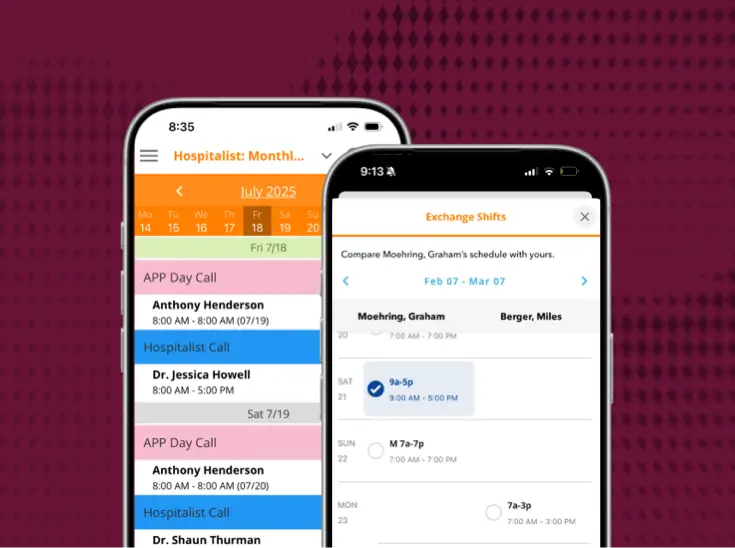
Residents and faculty get real-time visibility into schedules from any device, can request PTO and swap shifts through streamlined workflows, and receive updates instantly—reducing friction and improving satisfaction. Administrators can require approvals or allow self-service, and flexible swap options make finding coverage faster and more reliable.
Is this radiology scheduling software only for large groups, or can it help small practices?
Yes, it can help smaller practices! Many of our smaller practices find Lightning Bolt to be very beneficial to have one source of truth and be able to easily submit time-off requests, make last minute shift swaps, create optimal holiday schedules, access schedules on mobile, and overall experience an increase in convenience.
How does anesthesia scheduling differ from other medical specialties?
Every specialty operates differently and has its own set of priorities, but anesthesia is uniquely complex because it requires managing both a long-range staffing schedule and a daily OR case assignment layer—matching the right provider to the right procedure, room, and surgeon simultaneously. Lightning Bolt automates complex anesthesia schedules using priority rules that generate schedules meeting all rules and requirements, without leaving gaps, and balances call coverage across multiple locations. Few other specialties require those capabilities at the same scale.
How does scheduling software integrate with EHR and OR management systems?
Lightning Bolt streamlines workflows by integrating real-time schedules, provider availability, and other key metrics into the EHR, all while maintaining HIPAA compliance. This prevents communication and care delays by ensuring provider contact information is always accurate. On the OR side, Lightning Bolt integrates schedules into Epic OpTime for OR management and enhances on-call management in Epic with real-time scheduling data. Lightning Bolt can also connect to payroll systems like Kronos (to ensure timely, accurate payment for providers) and a range of clinical communication platforms (to facilitate more efficient care team coordination).
How can hospitals improve anesthesia staffing efficiency?
Auto-generated OR assignments that match supply and demand mean fewer transitions of care, fewer delays and cancellations, and greater provider satisfaction. At Ochsner Health, implementing Lightning Bolt saved approximately 720 hours annually and improved vacation request approvals by 55%, boosting provider engagement scores by 30% in under one year.
What is anesthesia call scheduling?
Call scheduling determines which anesthesiologists are available for urgent or after-hours cases, and it’s one of the most wellness-sensitive parts of the schedule. Lightning Bolt addresses this by generating gapless provider schedules using custom rules designed to include individual preferences and organizational needs, while giving providers the flexibility to swap shifts or request time off from anywhere.
How do hospitals schedule anesthesiologists?
Most hospitals have traditionally relied on manual, spreadsheet-based processes — with schedulers spending anywhere from 60 to 75 hours per month. manually creating and publishing schedules. With Lightning Bolt, hospitals use a process called combinatorial optimization to rapidly identify the optimal schedule by considering variables such as staff availability, skill sets, and shift preferences. This allows them to maximize resource utilization while meeting very specific organizational constraints.
What makes anesthesia scheduling difficult?
Anesthesia scheduling is uniquely complex because it requires balancing a large team of physicians, APPs, and CRNAs across a high volume of cases while accounting for individual preferences, skill sets, and shift requirements. Creating an optimal schedule is an arduous task that often requires edits after completion due to the difficulty of capturing each individual’s preferences the first time around.
What Are the Benefits of On-Call Provider Scheduling?
Download our infographic “6 Reasons to Implement an Enterprise On-Call Scheduling Platform” for a deep dive into the key reasons every hospital should consider an enterprise-wide physician scheduling solution.
Is this emergency medicine scheduling software only for large groups, or can it help small practices?
Yes, it can help smaller practices! Many of our smaller practices find Lightning Bolt to be very beneficial to have one source of truth and be able to easily submit time-off requests, make last minute shift swaps, create optimal holiday schedules, access schedules on mobile, and overall experience an increase in convenience.
Is this cardiology scheduling software only for large groups, or can it help small practices?
Yes, it can help smaller practices! Many of our smaller practices find Lightning Bolt to be very beneficial to have one source of truth and be able to easily submit time-off requests, make last minute shift swaps, create optimal holiday schedules, access schedules on mobile, and overall experience an increase in convenience.
What is Resident Scheduling Software?
Resident scheduling software automates the creation of residency schedules, replacing manual and more error-prone methods. These solutions build optimized schedules, automate shift changes and time-off requests, and alleviate schedule errors by accounting for unique rules like residency hour maximums and shift blocks.
Why Is Radiology Scheduling So Difficult?
Creating shift schedules for radiologists is a major balancing act, with multiple scheduling variables that often compete against one another. Without leveraging the right tools to build schedules, radiology groups get stuck with a time-consuming, inefficient process that typically requires hours to create, edit, and distribute schedules. Let’s explore some key issues that contribute to the complexity of radiology scheduling.
What Do Clinical Communication and Collaboration Platforms Do?
- HIPAA-compliant text messaging and voice communication, which includes the ability to send videos and images
- Message/call escalation and routing based on users’ role or availability
- Ability to view and update schedules from your smartphone
- Instant notification of critical lab results, orders, admissions, discharges, critical alarms, and time-sensitive team alerts (STEMI, sepsis, etc.)
- Ability to call back to a patient’s room from your smartphone when the nurse call button has been activated
- Send emergency broadcast messages related to weather, an active shooter, coding, or other events when expedited mass communication is necessary
- Facilitate message auditing with time and date stamps to see when all communications are sent, delivered, and read
Is AI Medical Answering Right for my Clinic?
No matter what you’re using to manage patient calls today, it’s worth exploring what AI can do for your organization.
An AI medical answering service will benefit your organization if you experience any of the following issues:
- On-call providers are overwhelmed with call volume
- Patients frequently bypass the voicemail tree to speak to a person
- Patients abandon calls before their issue is resolved
- Calls are lost, dropped, or frequently routed to the wrong place
- Providers who are not on call are receiving patient calls or messages
- Patients express frustration with your current call workflows
- Call schedules are being built by hand and/or are constantly changing
- Admins have no way to track call volume, routing rationale, or other call data
What can the right scheduling software do for group practices?
Once you’ve laid the groundwork for optimized scheduling, your group practice is ready to take its scheduling operations to the next level.
It’s hard to overstate the administrative impact of this technology: One health system reduced payroll processing time by 2,000 hours per year by linking its scheduling and payroll systems to automatically sync shifts and eliminate human error.
But the benefits go even deeper:
I have an answering service and a basic scheduling tool in place. Do I need better scheduling software?
Having a digital scheduling solution like the one included in PerfectServe’s application is a great start. But you still have to create the schedule manually, and for a small practice, this works. Yet as your practice grows, the schedules will get more complex. Then it will be time to upgrade.
Think about all your practice requirements, shift credentialing, provider preferences, and time off requests.
Rather than making a schedule, it creates the best possible schedule. And it does so in minutes. This not only frees up time for the scheduler, but also increases provider satisfaction.
I already have a scheduling solution in place. Do I really need an answering service?
Having a single source of truth to build a call schedule is a powerful start.
A scheduling solution without a tool to manage after-hours calls leaves the weight of non-urgent calls on the doctors’ shoulders. This means they get all the prescription refill requests, office hours questions, and appointment changes, leaving them to ask, ‘why am I getting this message’?
When patients need to place routine orders after the office is closed, or get a hold of a doctor on call, an accurate answering service routes them to the right provider at the right time they call in. Make the answering service go to work for your ‘boring’ tasks by empowering patients with clear prompt instructions.
I have an answering service. Why do I need a scheduling solution?
Most call services are rudimentary, and they may get calls to the right place when the schedule is accurate. What happens when a provider needs to call out after hours, or if a patient calls in?
Traditional answering services lack the integration needed to leverage schedules and create the single source of truth for seamless communication.
With Lightning Bolt scheduling, you can push inbound calls to route to the correct on-call physician, based on preferences and shifts. That means no more non-urgent calls rudely interrupting clinicians at 4 AM.
With Lightning Bolt scheduling, you factor in predetermined preferences and shifts, so no call gets missed and they land in the right place.
Is this scheduling software only for large groups, or can it help small practices?
Yes, it can help smaller practices! Many of our smaller practices find Lightning Bolt to be very beneficial to have one source of truth and be able to easily submit time-off requests, make last minute shift swaps, create optimal holiday schedules, access schedules on mobile, and overall experience an increase in convenience.
Does your team set up the scheduling rules, or can I?
We assist with initial setup and training. Users can choose to maintain the system themselves or rely on our support. If the rules change, we can also handle it or you can do it yourself.
Does your solution know which locations my providers are credentialed for?
Yes, Lightning Bolt allows you to select which assignments (locations) each individual is able to be scheduled for. This applies to automated scheduling as well as manual changes.
Do you only work with large health systems, or small practices too?
We work with medical groups of all sizes, from 1 provider practices up to large, multi-specialty and large-staffed healthcare systems. We customize call flows and schedules based on your specific needs. We can grow with your healthcare practice.
As a bonus, if you’re affiliated with or know a local hospital that uses PerfectServe, getting your medical practice on board may improve the efficiency of your workflows and callbacks. For example, the hospital can reach the on-call clinician or lab and receive a timely update.
How long does a demo take?
A demo with PerfectServe typically lasts about 20-30 minutes. Schedule one now to see how our solutions can benefit your organization.
Don’t have time? Take a product tour of our solutions.
Why do the wrong providers keep getting paged?
This is usually due to incorrect schedule and routing rules put in place by your organization or existing call service. It could be human error leading to misrouted calls, and the default is to forward a message to whatever number is available, whether that clinician is on call or off call. Thousands of medical practices have told us this before making the switch to PerfectServe.
With PerfectServe's accurate call routing and forwarding based on physician schedules, only on-call providers should receive urgent calls, and non-urgent messages can be routed to the office to handle the next business day.
Can PerfectServe patch calls through to the on-call provider?
Absolutely! PerfectServe offers the option to patch critical calls directly to the on-call provider. This ensures immediate and direct communication when necessary.
What custom reports does PerfectServe provide?
Simply by requesting any desired reports, custom queries can be conducted by a dedicated account manager. PerfectServe is also able to include call schedule details in reports. Frequently requested reports include: Emergency Department (ED) Service Call, Hours On Call Activity, Hours on Call Summary, On-Call Schedule History, and PHI Filter Audit.
What are the schedule interface and management capabilities?
a. PerfectServe provides considerable flexibility for configuring and managing schedules. During implementation, all schedules are obtained from each practice and incorporated into the tailored Dynamic Intelligent Routing algorithm. This removes the need for any individual to find and refer to a schedule—wherever it may be kept—when attempting to identify the correct physician/practitioner to contact. Post implementation, when changes to schedules occur, PerfectServe provides an intuitive interface to allow office staff to quickly and easily make modifications. When a schedule is updated, that change is reflected immediately across the platform, meaning all care team staff have real-time access to the most current schedule.
b. For organizations with more complex needs, PerfectServe's Lightning Bolt Scheduling solution is a powerful tool capable of auto-generating schedules for departments, groups, hospitals, and even health systems of any size. Lightning Bolt taps a mathematical process called combinatorial optimization to build balanced schedules that can account for any number of rules and preferences. Organizations using Lightning Bolt typically realize time and cost savings related to building and managing schedules, and more equitable schedules can also contribute to improved provider wellness and engagement.
c. PerfectServe also supports integrations with more than 250 other clinical systems, including any third-party scheduling solutions an organization may already have in place.
What value will PerfectServe bring to our practice administrator?
With PerfectServe, practice administrators can improve clinic workflows by streamlining calls from coordinating providers and facilities with 24/7 call management, eliminate answering services and associated errors that cause frustration among physicians, and ease the management of complex call schedules across multiple facilities. Administrators can easily access and change call schedules on the fly, expedite consults by allowing referring physicians easy access to practice staff, and set up any number of unique workflows that align with (and automate) the daily activities of their practice related to communication and care coordination.
How can you set up automatic routing?
PerfectServe purposefully built a platform that removes the hassle clinicians face every day when trying to connect with other care team members. Much of this hassle comes from uncertainty. Who's on call? Did those lab results get delivered to the physician? Did that nurse call alert get resolved? We work closely with all of our customers to learn about their workflows and how we can set up rules within our platform to automate them. This work is proven across 500+ hospitals and 10,000+ practices and post-acute care organizations. For more, read what our customers have to say.
Does PerfectServe do more than just communication?
Yes! Communication and clinical workflows have long been our expertise, but our vision has evolved quite a bit over the years. For organizations looking to maximize their investment by working with one partner to address a wide range of communication and scheduling needs, PerfectServe can do it all.
What is PerfectServe?
PerfectServe is a leading provider of technology that helps healthcare organizations communicate, coordinate real-time care delivery, and schedule their most valuable assets, including people, rooms, and even equipment. With our clinical communication, physician scheduling, operator console, and medical answering service solutions, we help our customers accelerate speed to care by ensuring the right people are in place at the right time to take action on important information related to patient care.
How does varying staff size impact pricing?
Licenses are per seat, so replacements don't affect pricing. However, a net increase in scheduled individuals requires additional licenses.
Can the system schedule nurses, mid-level providers, technicians, or physician assistants (PAs)?
Yes, our system is flexible enough to schedule any staff. It can also assign operating room (OR) cases to anesthesia staff and schedule examination rooms and even veterinarians.
Can I import my schedule into Outlook/Google Calendar?
Yes, using our subscriptions feature, your schedule will automatically update in Outlook or Google Calendar with any changes.
Does it work on a Mac, Windows, or Linux?
Lightning Bolt is web-based and fully functional on Mac, Windows, and Linux platforms.
Can I get my schedule on my iPhone/iPad/Android device?
Yes, our subscription feature allows you to get your latest schedule on any iOS or Android device, with real-time updates. We also offer a native iPhone app for free.
What is the key difference between Lightning Bolt and other products on the market?
Unlike other products that simply digitize manual scheduling, Lightning Bolt uses an AI-enabled process called combinatorial optimization to identify the best solution—in this case, a schedule—from a finite set of possibilities. By considering multiple variables such as staff availability, skill sets, and shift preferences, combinatorial optimization allows Lightning Bolt to rapidly identify the optimal schedule that maximizes resource utilization while meeting organizational constraints. This process advances operational efficiency, improves staff satisfaction by building fairer schedules, and enhances patient care by ensuring that the right personnel are in the right place at the right time.
Can I transfer my current information from different software to PerfectServe Lightning Bolt Scheduling?
Yes! We make your transition easy by importing a spreadsheet of your past schedules, including personnel, assignments, patterns, eligibility, and compatibility, ensuring all your historical data is available in Lightning Bolt for running reports.
Medical Answering Service
What happens when the on-call schedule changes?
Lightning Bolt updates the schedule directly, and Intelligent Answering reads that same schedule, so a same-day swap doesn't need a separate update.
Is my personal cell number ever shared with patients?
No. Patients see your office number, not your personal line, when you call or text back through PerfectServe.
What happens if I don't answer a call?
It escalates automatically to your backup or the next physician in your coverage plan.
Does the answering service know my specialty's rules?
Yes. Routing follows your specialty's rules, so urgent calls reach you with context and routine calls route to your admin team.
Can the system schedule APPs, nurses, technicians, or other staff?
Yes! Lightning Bolt is designed to schedule all types of healthcare staff, including advanced practice providers, nurses, and technicians. The system can handle different scheduling rules, shift patterns, and certification requirements for each role, making it ideal for comprehensive staff management.
I already use another system for scheduling and load it into PerfectServe, why would I need to switch?
While basic integration with other scheduling systems is possible, Lightning Bolt offers real-time synchronization (under one minute) that eliminates manual uploads and potential errors. Our AI-powered optimization creates more efficient schedules while respecting provider preferences, reducing administrative burden, and improving provider satisfaction—benefits that simply aren’t possible with disconnected systems.
How will the scheduling solution improve our patient experience beyond what the answering service already provides?
Accurate call routing depends entirely on provider scheduling data. With Lightning Bolt, you can build schedules up to a year in advance, allowing patients to schedule follow-up appointments months ahead without having to call back later. This eliminates the need for office staff to maintain callback lists when provider schedules become available, significantly improving patient satisfaction and reducing scheduling delays.
How much time will my staff save by using both solutions together?
While ROI varies by practice, our clients consistently report a significant reduction in schedule creation and management time. Consider the hours your team currently spends building schedules, balancing assignments, and incorporating last-minute changes—Lightning Bolt automates these tasks, potentially saving your staff countless hours each week. What could your team accomplish with that extra time?
What additional benefits do I get by combining both services?
By combining services, you’ll benefit from faster syncs (under one minute), unified provider data management, streamlined communication pathways, and consolidated support. The integrated solution eliminates data discrepancies between scheduling and your answering service, ensuring patients always reach the right provider at the right time.
Will switching to your scheduling solution disrupt our current workflows?
No. Our implementation team specializes in minimal disruption transitions. We migrate your existing schedules, rules, and preferences into the new system while maintaining your current operations. Most customers experience no service interruption, with a smooth transition that enhances rather than disrupts established workflows.
How does PerfectServe Lightning Bolt Scheduling integrate with my current answering service?
PerfectServe Lightning Bolt Scheduling seamlessly integrates with your existing answering service, providing real-time schedule updates that sync within one minute. This integration ensures your answering service always has the most current on-call information, reducing errors and improving communication efficiency.
Does PerfectServe's voice-to-text workflow also follow HIPAA guidelines?
Yes. The live operators who facilitate PerfectServe's voice-to-text functionality work entirely within PerfectServe's HIPAA-compliant platform. They transcribe patient calls into secure messages based on your preset routing rules. Nothing is handled outside the compliant framework. All messages are encrypted and delivered through the same PHI-safe system your practice relies on 24/7.
How does PerfectServe protect patient data?
Every message sent through PerfectServe is encrypted with AES-256 at rest and TLS 1.2 or higher in flight. All workflows are built to safeguard Protected Health Information (PHI), and every practice receives a signed Business Associate Addendum (BAA) before going live. Your on-call routing, secure messaging, and call transcriptions all operate within one HIPAA-compliant platform that prevents information gaps.
I don't have time to book a demo. Can I see it another way?
Certainly! Watch this live replay session at your convenience to get more of your questions answered. If you're still unsure or need a quick pricing quote, email connect@perfectserve.com and we will respond during regular business hours.
Will we have the ability to add more providers if needed?
Yes! We can adjust your contract accordingly, and you may reach out directly to your PerfectServe specialist to request any needed changes.
Can PerfectServe's medical answering service handle multiple physicians on call during different time frames?
Yes, PerfectServe's Dynamic Intelligent Routing® can be customized to accommodate multiple physicians on call during various time frames. By defining specific workflows, call schedules, and prompted responses, calls can be accurately routed to the appropriate providers.
Can callers speak directly to a live operator?
PerfectServe offers live operators who can transcribe calls into text messages, providing medical professionals with easily readable text notifications while protecting their personal caller ID. Live operators ensure that important patient information is relayed accurately. They are not triaging the calls, only transcribing messages based on your routing rules, which are determined ahead of time.
Which medical specialties do you serve?
From masking caller IDs for psychiatry practices, to supporting secure workflows at multi-specialty groups, we serve all specialties with over 800+ templates to choose from. We can customize how you want your secure messages to be transcribed and sent. For example, nephrology may need a 'BUN' or 'Creatinine' field, family medicine may need a 'Reason for the call' field. OBGYN practices may need a 'Number of Weeks' field to collect the right patient information, all while remaining HIPAA compliant.
My practice is small. Can PerfectServe still help?
We work with medical groups of all sizes, from 1 provider practices up to large, multi-specialty and large-staffed healthcare systems. We customize call flows and schedules based on your specific needs, and can grow with your healthcare practice.
What if the doctor is hesitant to change or adopt this technology?
We walk with you to ensure clinicians easily understand how to use the platform. See how practice administrator Lea with Cherry Creek Eye Physicians and Surgeons got buy-in from her doctor. If you still have questions after implementation, our 24/7 support team is here to help you step-by-step, instilling confidence for the clinician using the PerfectServe platform.
How much does PerfectServe's Answering Service cost?
We offer a flat-rate, monthly price option based on your location, complexity, and specific needs. No surcharges or minute-by-minute billing. There are a few levers that will determine pricing, but a typical practice usually pays between $89-$119/month per doc. We factor in which hospitals you might be affiliated with, how many providers you will need on the platform, how long you would like to commit to, and if you want additional features like Voice-to-Text. We can easily discuss it in person. Schedule a demo and get your custom price quote.
What is the After-Hours Medical Answering Service?
Medical answering services manage patient calls outside regular hours, like overnight or on weekends, and can also support busy staff during the day.
Without these services, practices often face delays and disjointed communication, leading to frustration for both providers and patients.
With a properly equipped answering service in place, establishing an accurate menu prompt that’s easy to understand improves the calling experience for inbound patient and hospital calls, especially when your team isn’t immediately available.
Here’s an example of how a primary care medical group managed routine after-hours calls:
What happens if the caller keeps pressing urgent, even when it’s not?
In the basic example, you could change the “urgent call that requires attention” to Press 3, and “for appointments, prescription refills, and all other non-urgent matters,” to Press 1. This provides an initial layer of filtering for most small practices.
PRO TIPNeed more than the basics?
If you have complex medical answering service needs, the examples on the next few pages are PerfectServe’s bread and butter. Our implementation team can easily create these call flows with you, while leveraging the Dynamic Intelligent Routing® engine built into our desktop and mobile apps.
Get Your Free Voicemail Guide
Intelligent Answering: What Is It and Who Is It For?
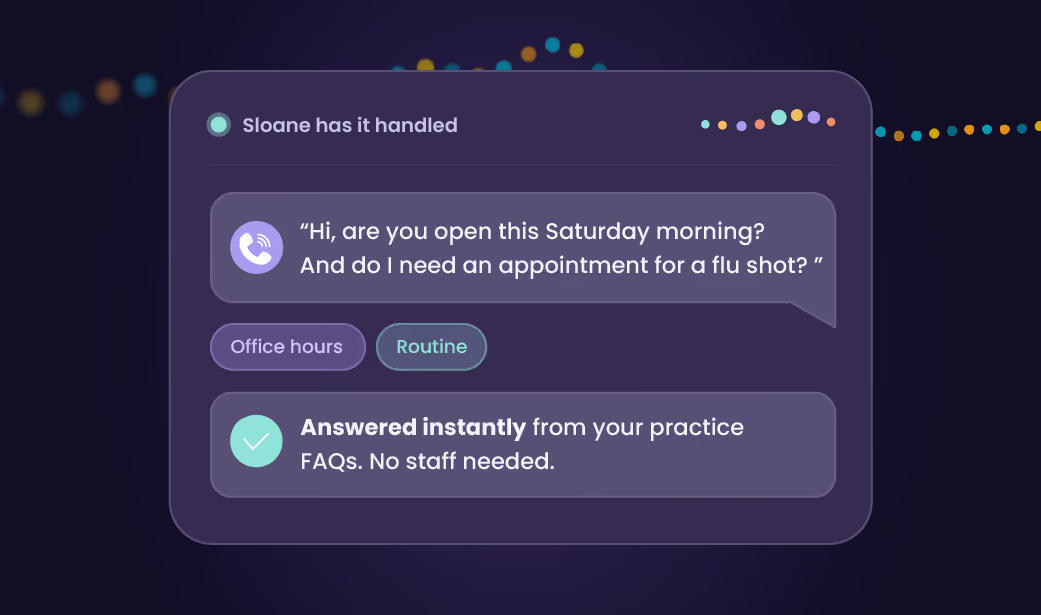
Intelligent Answering features a conversational, multilingual AI agent named Sloane that healthcare organizations can use alongside phone menus and live answering services.
For PerfectServe, AI was the next natural layer to add to the medical answering service that traces all the way back to the company’s founding in 1997. We’ve spent nearly 30 years understanding the best ways to route calls and other important information for healthcare organizations, and we’ve pulled all that expertise into building an AI agent that is secure and reliable enough to clear a HIPAA AI audit.
Here’s what makes Intelligent Answering different:
Is AI Safe for the Medical Answering Service?
AI can meaningfully improve how calls are triaged and routed, but it isn’t infallible. No practice should treat it as a perfect replacement for existing workflows and clinical judgment.
Conversational AI deployed in this medium is built to recognize language patterns, not to diagnose patients or make other clinical decisions. It can be equipped with a robust knowledge base to give it an impressive level of situational intelligence, but it can still miss context a trained provider would catch, especially with ambiguous symptoms or a caller who’s struggling to clearly articulate what’s going on.
That’s why the safest AI implementations are designed to be clear and honest, with escalation and redirect paths available when uncertainty creeps in. Safeguards must be put in place:
- The system should immediately identify itself as AI to remove ambiguity.
- If a true emergency is detected, callers should be instructed to hang up and dial 911.
- If the caller becomes confused or irritated, or if the system is struggling to make the correct choice, a fallback path should be available. The fallback can direct callers to a voicemail inbox, an IVR (phone menu) workflow, or even a live person.
The practices that will get the most value from an AI agent will treat the technology as a helpful triage layer with predetermined guardrails. To utilize AI in the safest way possible, your practice should take the aforementioned precautions while also performing ongoing reviews of call transcripts and routing decisions to make sure everything’s working correctly.
When deployed properly, AI can reduce noise, lower administrative burdens on staff, and get calls to the right place in a timelier fashion. Without safeguards in place, it can frustrate callers, make poor decisions, and cause more trouble than it alleviates.
Just like any other technology, AI should be implemented thoughtfully in a way that allows it to earn trust over time.
Is AI Medical Answering Right for my Clinic?
No matter what you’re using to manage patient calls today, it’s worth exploring what AI can do for your organization.
An AI medical answering service will benefit your organization if you experience any of the following issues:
- On-call providers are overwhelmed with call volume
- Patients frequently bypass the voicemail tree to speak to a person
- Patients abandon calls before their issue is resolved
- Calls are lost, dropped, or frequently routed to the wrong place
- Providers who are not on call are receiving patient calls or messages
- Patients express frustration with your current call workflows
- Call schedules are being built by hand and/or are constantly changing
- Admins have no way to track call volume, routing rationale, or other call data
I have an answering service and a basic scheduling tool in place. Do I need better scheduling software?
Having a digital scheduling solution like the one included in PerfectServe’s application is a great start. But you still have to create the schedule manually, and for a small practice, this works. Yet as your practice grows, the schedules will get more complex. Then it will be time to upgrade.
Think about all your practice requirements, shift credentialing, provider preferences, and time off requests.
Rather than making a schedule, it creates the best possible schedule. And it does so in minutes. This not only frees up time for the scheduler, but also increases provider satisfaction.
I already have a scheduling solution in place. Do I really need an answering service?
Having a single source of truth to build a call schedule is a powerful start.
A scheduling solution without a tool to manage after-hours calls leaves the weight of non-urgent calls on the doctors’ shoulders. This means they get all the prescription refill requests, office hours questions, and appointment changes, leaving them to ask, ‘why am I getting this message’?
When patients need to place routine orders after the office is closed, or get a hold of a doctor on call, an accurate answering service routes them to the right provider at the right time they call in. Make the answering service go to work for your ‘boring’ tasks by empowering patients with clear prompt instructions.
I have an answering service. Why do I need a scheduling solution?
Most call services are rudimentary, and they may get calls to the right place when the schedule is accurate. What happens when a provider needs to call out after hours, or if a patient calls in?
Traditional answering services lack the integration needed to leverage schedules and create the single source of truth for seamless communication.
With Lightning Bolt scheduling, you can push inbound calls to route to the correct on-call physician, based on preferences and shifts. That means no more non-urgent calls rudely interrupting clinicians at 4 AM.
With Lightning Bolt scheduling, you factor in predetermined preferences and shifts, so no call gets missed and they land in the right place.
Can you do daytime routing too?
Yes, PerfectServe’s Dynamic Intelligent Routing® handles communication based on various factors, including the time of day. This ensures that messages are accurately routed to the right person, whether it’s during the day or after hours. It’s fully customizable.
Is PerfectServe's live operator service part of the flat-rate pricing?
The live operator service is an additional fee, but it is included in the flat monthly rate. PerfectServe's pricing structure allows for transparent and predictable costs, with the live operator service adding an extra layer of communication support.
Are PerfectServe live agent operators medically trained?
While PerfectServe operators are not medically trained, they are trained to efficiently transcribe and relay critical patient information. All routing and workflow decisions are made prior to reaching the operators, ensuring consistent and accurate message delivery.
How does PerfectServe address 24/7 communications?
PerfectServe uniquely provides call management capabilities to more than 10,000 physician practices. Our Dynamic Intelligent Routing ensures that incoming calls and messages immediately reach the correct care team member, dramatically reducing patient wait time. We also provide the option for voice-to-text transcription. With this capability, practices are able to manage all communications with a single solution across multiple clinic sites and healthcare facilities while alleviating the costs of a human-centric answering service. Because PerfectServe can intelligently direct communications without human involvement, it's prepared to help your patients on their care journey 24/7/365.
How does the automated escalation capability work?
PerfectServe has two core escalation capabilities. First, notification escalation processes can notify the recipient of unacknowledged messages, and can be sent to multiple devices or end points simultaneously or in succession. Second, PerfectServe provides a backup escalation process to copy messages to other users if unacknowledged by previous recipients within a designated time frame. PerfectServe also has the ability to hold messages for future delivery—say, an after-hours call about a prescription refill that doesn't need to be delivered immediately.
What value does PerfectServe bring to ambulatory care settings?
PerfectServe uniquely provides communications management functionality for any size physician group or other ambulatory care setting. It supports 1) efficient management of all incoming communications, using Dynamic Intelligent Routing, from multiple affiliated facilities and organizations across multiple practice sites; 2) the ability to communicate with patients while maintaining caller ID privacy and overcoming caller ID block; 3) automated answering service functionality to eliminate lost and delayed messages while improving patient call response time; and 4) documentation of care coordination to increase reimbursement.
Clinical Communication
What happens on a shared device unit?
Shared device support ties the device to the role and shift, so the right person gets the right alerts when they sign in.
Does it work inside the chart?
Yes. Our available EHR-embedded messaging module lets nurses send and receive messages directly from the patient chart, with patient context attached. Intelligent routing still applies, so a message sent from the chart reaches the same correct recipient it would from the mobile app.
Will this mean more alerts, not fewer?
The opposite is the point. PerfectServe organizes communication for nurses so the information they receive is relevant, timely, and easy to consume. Routine, non-clinical requests for things like water or bathroom assistance can be programmed to route automatically to a patient care tech or comparable role, so RNs stay on top-of-license work.
Can the system send mass notifications instantly?
Yes, our system allows for the instant sending of mass notifications, ensuring timely communication with relevant parties.
How does the system provide a better call-in experience for patients?
Our system offers features such as clinical and staff directory, customizable interfaces, and instant mass notifications, ensuring a smooth and efficient call-in experience for patients.
How much does PerfectServe cost?
PerfectServe uses custom pricing based on organization size and the solutions you need, such as clinical communication, scheduling, operator console, or medical answering service. Request a demo for a quote tailored to your environment.
What happens when a schedule changes inside PerfectServe?
When any schedule update is made (whether it’s with PerfectServe’s native on-call scheduling setup or the more advanced Lightning Bolt Scheduling system), PerfectServe reflects that change in real time so every care team member instantly sees the most current on-call data. That means message routing is always guided by current scheduling information.
Is PerfectServe only suitable for physicians and nurses?
PerfectServe is built for every care team role, including nurses, physicians, operators, schedulers, and even non-clinical roles like security, environmental services, or spiritual services.
Can PerfectServe replace our pagers?
Yes. PerfectServe runs on the devices teams already use (smartphones, desktops, and VoIP phones) and can work alongside legacy pagers during a transition rather than forcing an overnight switch. Organizations commonly use it to retire pager fleets while keeping critical alerts reliable.
Does PerfectServe integrate with our EHR and existing systems?
Yes. PerfectServe integrates with Epic, Oracle Health (Cerner), and 270+ clinical systems, including nurse call and alerting platforms, lab and radiology systems, telephony providers, and pager networks. Messaging can be embedded directly in the EHR, so patient context travels with every on-call message and clinicians don’t switch between applications.
Is clinical communication software only for messaging?
No. Modern platforms like PerfectServe handle secure messaging, voice calls, on-call scheduling, critical alerts, patient & family communication, and after-hours call management in a single app.
Is clinical communication software only for large hospitals?
No. The best platforms can scale from single-specialty clinics to large health systems. PerfectServe serves both 500+ hospitals and 10,000+ medical practices, using the same routing engine for acute and post-acute care settings.
What is clinical communication software?
Clinical communication software replaces pagers, overhead paging, and disconnected apps with a single secure platform for care team messaging, voice, alerts, and on-call coordination. The strongest platforms connect to the EHR for patient context and route each message based on who is on call, so the right clinician is reached the first time. PerfectServe adds intelligent routing and real-time scheduling to that foundation, which reduces delays and misdirected messages across the care team.
How Does Secure Patient Communication Work?
Traditionally, practices and medical providers have been forced to use multiple platforms to achieve secure patient communications. Ensuring all information on multiple platforms is current and correct requires more staff and time. Now, they have options to streamline the workflow for health information, provider communication, reminders, HIPAA-compliant texting, and patient records all within one platform.
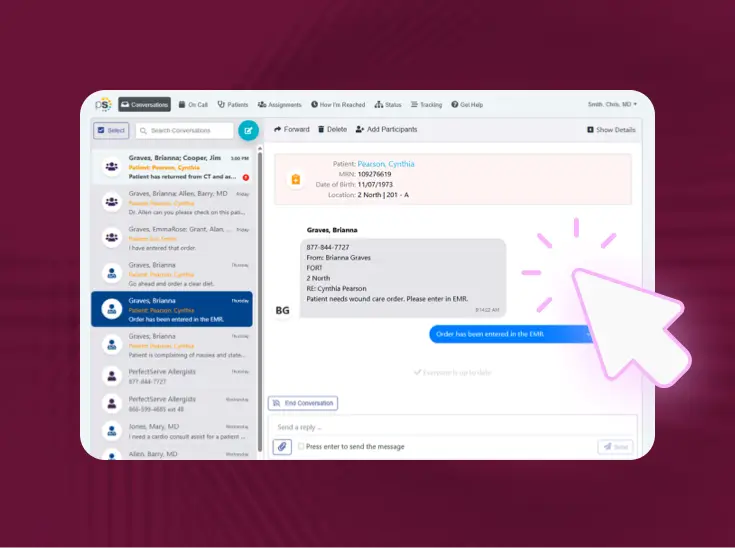
What is EHR-embedded messaging?
Embedded messaging is a popular feature that integrates secure clinical communication directly within an EHR interface. Rather than switching from the medical record to a separate app for communication, embedded messaging allows clinicians to view and send messages related to a specific patient right from the EHR.
What Do Clinical Communication and Collaboration Platforms Do?
- HIPAA-compliant text messaging and voice communication, which includes the ability to send videos and images
- Message/call escalation and routing based on users’ role or availability
- Ability to view and update schedules from your smartphone
- Instant notification of critical lab results, orders, admissions, discharges, critical alarms, and time-sensitive team alerts (STEMI, sepsis, etc.)
- Ability to call back to a patient’s room from your smartphone when the nurse call button has been activated
- Send emergency broadcast messages related to weather, an active shooter, coding, or other events when expedited mass communication is necessary
- Facilitate message auditing with time and date stamps to see when all communications are sent, delivered, and read
What if our nursing staff don't use smartphones?
PerfectServe is able to expedite care team collaboration using the care team web application alone—device independent—or using the web and legacy VoIP devices. Since PerfectServe has the unique capability to integrate with legacy VoIP phone devices, notification with the secure message in its entirety can be delivered to these devices while the care team member is mobile providing care. PerfectServe does support greater nurse mobility for organizations that are ready to implement a mobile device strategy, but we're always prepared to satisfy a customer's current needs based on best practices without forcing a particular strategy.
What makes PerfectServe different?
a. PerfectServe differs from other secure messaging/clinical communication platforms with its proprietary Dynamic Intelligent Routing technology, which automatically identifies and provides immediate connection to the right care team member for any given clinical situation. With every communication that occurs, PerfectServe analyzes a combination of real-time situational variables to ensure that the communication is delivered to the right physician, nurse, or other care team member for the clinical situation at hand. This capability prevents clinicians from having to manually search for an intended recipient's contact information, only to find out that they've called the wrong person.
b. This advanced routing capability facilitates powerful communication-driven workflows and enables time-sensitive, collaborative care delivery. Our cloud-based architecture is the only platform purposefully designed to transcend geographic and organizational barriers to drive collaboration among all stakeholders and across all care settings. Our experienced technical and clinical consultants work closely with you to customize a solution that best meets your patient care workflow needs.
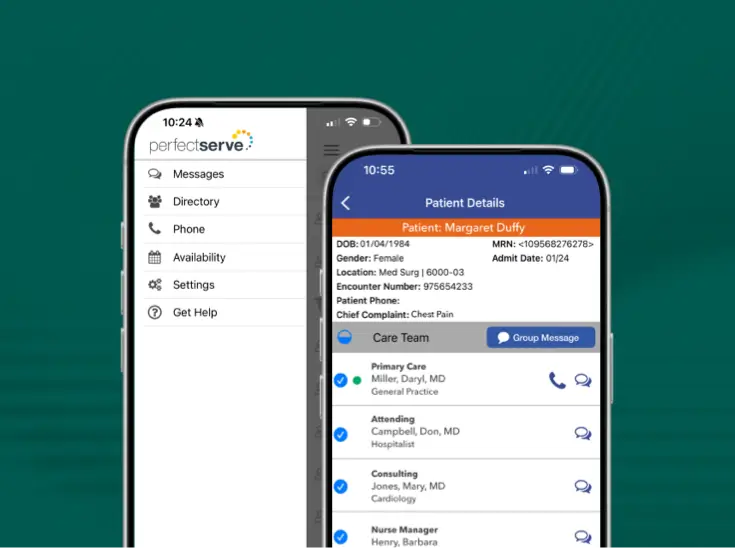
c. PerfectServe provides patient-centered real-time identification and access to the patient's active care team. Any care team member responsible for providing care to the patient at that moment in time is listed and can easily be contacted with a single click.
d. PerfectServe has proven high-value integrations, including the ability to leverage the data in the EHR and other applications to ensure that the most up-to-date information is delivered to the right care team member who needs it at that particular time. Moreover, PerfectServe is able to integrate with legacy VoIP phone devices, optimizing this substantial investment by sending secure text messages—generated with a smart device or the web application—directly to the VoIP device. In this way, care team members can immediately be apprised of new messages when they're moving around to provide care.
Is PerfectServe a texting app?
PerfectServe is more than just texting. Yes, our solution supports bidirectional secure messaging to improve communication between providers and care teams. But we go beyond secure messaging to make sure your messages get to the correct clinician for any given situation, even if you're not sure exactly who that person is at the moment. PerfectServe can also auto-escalate messages that aren't answered in a timely manner, meaning you don't have to worry that your communications aren't being received.
Operator Console
How is it priced?
By the unit that scales with each product: operators for Operator Console, hospital beds for Clinical Communication, and people scheduled for Lightning Bolt Clinical Team Scheduling. Acute agreements are packaged to the organization, so a consultant will scope pricing on the discovery call.
Can PerfectServe support a patient command center or integrated operations center?
Yes. Two published clients built one with PerfectServe as the communication backbone, managing placement across thousands of beds and running multiple call queues with a real-time wall board showing queue load across sites.
How does this affect patient throughput?
By removing the waits between steps. When the operator can see the on-call specialist and the bed in one console, and a page reaches the clinician who is genuinely on call, decisions happen sooner.
Is Operator Console compatible with our existing phone system?
Yes. Operator Console is cloud-based and PBX-agnostic, so it preserves your existing telephony investment while retiring the aging on-prem hardware and specialized telecom resources a legacy switchboard requires.
What interfaces does your system integrate with?
EHR, pager, SMS, clinical communication system, provider schedules, nurse call, hospital phone system, PSTN, and overhead paging that are included out of the box to reduce setup time and integration costs.
How does the system ensure patient information is provided as needed?
Our system integrates with your EHR and is designed to provide relevant patient information during communications, ensuring that operators have access to necessary information when interacting with patients and providers.
What information can be viewed within the console?
The console provides access to call queues, active calls, parked callers, call history, codes, PHI, shared directory, schedules, and information on who's currently on call within the organization.
Does the system support two-way messaging with sent, received, and read receipts?
Yes, our system supports two-way messaging with comprehensive tracking of message status, including sent, received, and read receipts.
Can the system send mass notifications instantly?
Yes, our system allows for the instant sending of mass notifications, ensuring timely communication with relevant parties.
How does the system provide a better call-in experience for patients?
Our system offers features such as clinical and staff directory, customizable interfaces, and instant mass notifications, ensuring a smooth and efficient call-in experience for patients.
What is the shared directory of users and providers?
The shared clinical directory allows for easy access to contact information for locations, clinicians, on-call providers, response teams, and patients to reduce time-consuming searches for operators.
Can operators support hospitals from any location?
Yes, our system enables operators to effectively support hospitals from any location with internet access, ensuring seamless communication regardless of physical location.
Does the system work with existing PBX/phone systems?
Yes, our system seamlessly integrates with your existing PBX/Phone System through SIP Integration, ensuring compatibility and ease of use.
How does the system reduce the risk of downtime and costs?
By providing reliable uptime of 99.99% and minimizing the need for upgrades, our system helps reduce the risk of downtime and associated costs for your organization.
What does "no more upgrades" mean?
Our cloud-based system is designed to eliminate the need for constant updates and upgrades, providing you with a stable and reliable platform without the hassle of frequent software or hardware updates.
What does AI readiness look like for cloud versus on-prem solutions?
AI readiness is less about any single feature and more about whether the underlying architecture can support AI at all: accessible, centralized data, open APIs, and the ability to connect to modern AI services. Cloud-native operator console platforms are built for this. Data is unified rather than siloed across on-site servers, and new AI capabilities can be deployed at scale through over-the-air updates.The journey looks a bit different with on-prem solutions. Adding new features requires IT resources, capital investment, and planned downtime for upgrades. For health systems running multiple contact center locations, that often means different sites operate on different software versions until every upgrade is complete, while a cloud platform updates all users at once.
Can operators work remotely?
Yes. Because PerfectServe is cloud-native and location-independent, remote operators have the same capabilities as on-site staff. That differs from on-prem systems that tie operators to workstations.
Patient Engagement
Do patients or family members need to download an app or create an account?
No. Patients receive a text message and use a browser on their phone. There’s nothing to install and no portal account to create.
Can patient engagement software integrate with existing healthcare systems?
Many patient engagement platforms integrate with EHRs, scheduling tools, and clinical communication systems to streamline workflows and ensure providers have access to up-to-date patient information.
How does patient engagement software improve patient outcomes?
By keeping patients informed and connected between visits, patient engagement software can support treatment adherence, reduce missed appointments, improve follow-up communication, and help care teams identify issues earlier.
What is patient engagement software?
Patient engagement software helps healthcare organizations communicate with patients throughout their care journey using tools like secure messaging, appointment reminders, automated follow-ups, video visits, and educational outreach.
Platform, security and implementation
How do we get started, and what does it cost?
Patient and Family Communication is a feature embedded within the Clinical Collaboration app. Your PerfectServe account representative can walk you through setup, rollout, and pricing for your organization.
Is there a record of patient and family communication?
Yes. Messaging and video reports capture direction, timestamps, sender, recipient, contents, duration, and status. You can filter them by account and date.
What can clinicians send?
Free-text messages or saved templates, plus PDF, JPG, and PNG attachments. Attachments work in both directions, so patients can send files back too.
Can clinicians start a video visit with a patient?
Yes. From the same thread, a clinician can send a video invite or join right away. The patient opens a browser lobby, is prompted to check their mic and camera, and joins. No separate video app is required.
Can family members or caregivers join the conversation?
Yes. A family member, loved one, or caregiver can be added to the patient’s thread. They’re verified against the patient’s date of birth, so everyone is in the same conversation instead of calling the nurse station for updates.
How are patients verified?
On first contact, thepatient verifies their identity with their date of birth and sets a PIN. Afterthat, they use the PIN to read and reply to messages in their browser.
What does Lightning Bolt customer support look like?
TPMG has a team of Lightning Bolt consultants and customer success resources dedicated to their success and available to help with schedules, refining rules, establishing integrations. We also offer 24/7/365 support via our Help Desk.
Does Lightning Bolt integrate with ClinConnect?
Yes, Lightning Bolt integrates seamlessly with Clinician Connect to provide on-call schedule visibility across regions and specialties.
How does PerfectServe Operator Console compare with Spok and Amtelco?
Read our full comparison here.
What do customers say about Operator Console
For 2026, we had a 99% retention rate for Operator Console customers. The same customers gave us a 100% satisfaction score.
Which RHT strategic goals does PerfectServe support?
PerfectServe supports Technology Innovation (cloud-based communication and scheduling infrastructure), Workforce Development (scheduling tools that reduce burnout and improve retention), Sustainable Access (operator console and patient engagement tools that extend care reach), and Innovative Care Models (integrated communication workflows that enable team-based and virtual care).
How does my facility access RHT funds for PerfectServe?
RHT funds flow from CMS to participating states, which then allocate dollars to rural hospitals and health systems. If your state has an approved RHT plan, your facility may be eligible to direct a portion of that allocation toward qualified technology investments like PerfectServe.
Does PerfectServe qualify for Rural Health Transformation funding?
PerfectServe's clinical communication, physician scheduling, operator console, and patient engagement solutions align with the RHT program's technology innovation, workforce development, sustainable access, and innovative care goals. Qualification is determined at the state level based on your facility's approved transformation plan, but PerfectServe's product suite is designed to meet the criteria these plans prioritize.
We're already a PerfectServe customer. What's our path?
Reach out to your account team or request a demo here, and we'll fold Intelligent Answering into your existing setup.
How do I get pricing?
Talk to our team. Pricing depends on practice size and call volume, and we'll give you a clear number after a short conversation about how your practice runs.
Does the AI learn from or retain our call data?
No. AI vendors are contractually prohibited from retaining PHI or using your calls for model training.
What if it gets the routing wrong?
Every decision is logged with a full transcript and routing rationale. You can review and refine in real time. Visibility that doesn't exist with IVR.
Do we need a new phone number?
No. Sloane answers on the same main line your patients already use.
What languages does it speak?
Full conversations in the caller's preferred language. English and Spanish at launch, with 70+ more coming soon.
Does it make clinical decisions?
No. It routes calls. It doesn't diagnose, triage, or give medical advice. Your clinical team defines every urgency rule. The AI applies them.
What is Intelligent Answering?
An intelligent answering service that modernizes the calling experience to natural conversation, routing every call correctly once configured to your practice.
What is a clinical communication and collaboration platform?
Software that routes messages, calls, and alerts to whoever is responsible for a patient right now. It replaces pagers, overhead paging, basic secure messaging, and printed call schedules.
Does it integrate with the EHR?
Yes. Operator Console integrates with the EHR to surface relevant patient information during a call and to attach patient records to messages. In our 2026 survey of 105 IT and operations leaders, only 39% reported EHR integration in their contact center, which is one reason operators at many hospitals still run the EHR on a second screen.
Does it work with our existing PBX or phone system?
Yes. Operator Console integrates with existing PBX and UCaaS systems, so the phone infrastructure can stay while the operator environment is replaced. PerfectServe supports 270+ integrations across EHR, telephony, scheduling, patient flow, and clinical communication systems.
Is it secure?
Yes. PerfectServe is HIPAA-compliant, SOC 2 certified, and adheres to the highest security standards.
Does PerfectServe integrate with our EHR and other existing systems?
Yes. PerfectServe integrates with more than 270 clinical and IT systems, including EHRs, nurse call, telemetry, paging, PBX, and SSO/device management.
How much of my day does this actually save?
Schedulers using Lightning Bolt have cut schedule-creation time by up to 82%. Practices on Intelligent Answering see 70% of calls resolved with zero staff involvement.
How is this different from just training staff to answer the phone better?
Training doesn't fix a schedule that falls apart the moment coverage changes. Medical Answering Service and Intelligent Answering route calls off your real, current schedule automatically, so the routing stays correct without anyone manually updating anything.
We already use Lightning Bolt. Can we add the answering service later without starting over?
Yes. Reach out to your account team or request a demo, and we'll fold whichever product you're adding into your existing setup.
Do I have to manage three separate vendor relationships to use all of this?
No. Lightning Bolt, Medical Answering Service, and Intelligent Answering are all PerfectServe products, and you have a dedicated team to support you.
What if it fails at 2 AM?
Redundant AI providers and automatic IVR fallback. No single point of failure.
How does it distinguish urgent from non-urgent?
Semantic analysis: it understands context, not trigger words. A patient worried about an abnormal lab result gets a morning callback, not a 2 AM page.
What happens when the call schedule changes?
The answering workflow reads the live schedule, so a swap is reflected the moment it’s made. You can forget about the days of faxing and waking up the wrong physician.
How does PerfectServe integrate with our EHR?
PerfectServe integrates directly with the EHR you already run, so clinical communication works from the same data your care teams use rather than a parallel system IT must reconcile separately.
Is every schedule change documented on one record?
Yes. Every schedule change is captured with time stamps: what changed, who covers now, and when the change was made. Some schedule changes can be automated, while other changes can be flagged for approval before they're made.
If a management company standardizes scheduling across our centers, do surgeons lose control of their own schedules?
No. Surgeon and department-level rules stay local. Operations gets one view across every center while each surgical group's schedule continues to follow their own rules and preferences.
How is this different from a spreadsheet or another scheduling tool?
Lightning Bolt is built specifically for physician and staff scheduling. It applies your group's own rules for call rotation, and anesthesia coverage automatically, instead of you rebuilding those rules by hand every scheduling cycle.
What happens when a provider requests time off or something changes last-minute?
Instead of rebuilding from scratch, the schedule holds and adjusts around changes, so coverage gaps and last-minute scrambling become the exception instead of a constant occurrence.
We're already a PerfectServe customer. How do we add another product?
Reach out to your account team or request a demo, and we'll fold whichever product you're adding, Medical Answering Service, Intelligent Answering, or Lightning Bolt, into your existing setup.
Can Lightning Bolt handle multiple locations and specialties?
Yes. There's no technical limit on providers or locations, and it's built to fit practices of any size, including smaller practices that want one source of truth for scheduling.
How much time can our scheduler expect to save?
Schedulers have cut schedule creation time by up to 82%, because Lightning Bolt auto-generates the schedule around real coverage needs, rules, and preferences instead of you rebuilding it manually every time something changes.
How long does implementation take?
Implementation time depends on the size and complexity of the customer. Once we've gone through discovery, our team can give you a better idea of the timeline.
What's the difference between Medical Answering Service and Intelligent Answering?
Medical Answering Service pairs trained live operators, available 24/7, with Dynamic Intelligent Routing that sends every call to the right person automatically based on urgency and time of day, on one flat monthly rate.
Do patients talk to a machine?
Patients follow a short, guided workflow to get them to the right place. Urgent needs to reach a covering clinician fast. How the flow sounds is configured with you.
Can it follow our protocols?
Yes. Call handling runs on the practice's own protocols, including what counts as urgent for your patient population and who covers.
Is the schedule available on mobile?
Yes. Lightning Bolt has a native iPhone app plus Android support, and a real-time link the group can share with anyone who needs to see the schedule.
Can it handle a large or growing group?
Yes. There is no technical limit on the number of providers or tasks, and new CRNAs or anesthesiologists can be added.
Can a provider be restricted to specific locations?
Yes. Providers can be restricted to eligible assignments and locations, and those rules apply to both automated scheduling and manual changes.
Do CRNAs and anesthesiologists share one schedule?
Yes. CRNAs and anesthesiologists can be scheduled on the same platform, with rules that reflect each role's coverage requirements.
Will a patient with a real OB emergency ever get stuck with an AI dead end?
No. Intelligent Answering keeps a human escalation path open at every step. Any call that looks like true obstetric urgency routes to the covering physician. It never ends in an automated loop.
Does call routing account for different specialties?
Yes. Our system is customizable, so no two specialties will have workflows routed the same way. Customers also have access to the rules that dictate PerfectServe workflows for full visibility.
Will our costs still swing with call volume?
No. Both Medical Answering Service and Intelligent Answering run on one flat monthly rate, not per-minute billing, so a busy month doesn't mean a surprise invoice.
What does this mean for our physician owner's personal liability?
Every after-hours contact is documented automatically with a full, defensible audit trail, closing the exposure that built up every time an undocumented call landed on a personal cell.
How is this different from IVR or a chatbot?
It understands what callers mean, not just keyword matching. Full intent understood, full context of the call captured. IVR cannot do that, and chatbots aren't there yet.
Can Intelligent Answering follow our practice's own protocols?
Yes. Routing runs on your practice's rules, including what counts as urgent for your patient population and who is covering, not a generic menu applied to every caller the same way.
Will PerfectServe replace my pager?
Yes. Secure messaging and role-based routing do the job pagers did, plus an audit trail and routing logic pagers never had.
What happens if the Operator Console platform goes down?
Operator Console is built for 99.99% uptime on cloud infrastructure, so it isn't dependent on a single on-prem switchboard.
Does Lightning Bolt work for health systems with multiple hospitals and departments?
Yes. Lightning Bolt is built for organizations of any size, from a single department to a multi-hospital health system, on the same optimization engine.
Can PerfectServe replace multiple hospital systems with one platform?
Yes. PerfectServe can consolidate up to 14 fragmented point solutions and integrates with 270+ existing systems, so consolidation can happen in phases.
Is PerfectServe secure enough for enterprise health system deployment?
Yes. PerfectServe is HIPAA-compliant and SOC 2 certified, using AES-256 encryption at rest and TLS 1.2+ in transit. We're also approved by Censinet, an AHA Preferred Cybersecurity Provider.
Is this built for small groups, or only large networks?
Both. Groups from a handful of radiologists to 200-plus across a larger network can run on the same platform.
What happens when the rules change?
You can update the rules yourself, or lean on your dedicated technical consultant, whichever your group prefers.
Does it account for subspecialty and credentialing?
Assignments are matched to each radiologist's subspecialty training and credentialing automatically, so a shift never lands on someone who isn't qualified to cover it.
Can it handle radiologists covering multiple sites?
Yes. Radiologists and techs covering imaging centers and hospitals get one schedule instead of a separate one per site.
How does the AI layer handle emergencies and 911?
It detects potential emergency situations and immediately directs callers to call 911. It does not perform clinical triage.
Does AI call handling make clinical decisions?
No. It routes calls. It doesn't diagnose, triage, or give medical advice. Your clinical team defines every urgency rule. The AI applies them.
Is every call documented?
Every call is logged automatically, including caller name, date of birth, and callback number, with a full audit trail.
Will the call routing follow our own protocols, or a generic template?
Your practice's protocols drive how calls get routed and handled. Your practice knows best as to what counts as urgent for your patients.
Do I need to carry another device?
No. It runs on any smartphone or mobile device your nurses already carry, in both shared device and BYOD environments. Communication is HIPAA-compliant, and the platform is SOC 2 certified.
Is PerfectServe secure and HIPAA-compliant?
Yes. PerfectServe is HIPAA compliant and SOC 2 compliant, with AES-256 encryption at rest, TLS 1.2+ encryption in flight, full audit trails, and no locally cached PHI.
Is routing and scheduling documented for audits and compliance?
Yes. The communication record, including every after-hours contact, is logged, and every schedule change is visible as well.
Is this disruptive to physicians who already trust their setup?
It doesn't have to be! Rollouts can be tailored to a schedule that works best for the customer, which may include phasing people in department by department. We also make sure to build rules alongside your clinical team, so they never feel imposed.
Does after-hours routing account for different specialties?
Yes. Our system is customizable, so no two specialties will have workflows routed the same way. Customers also have access to the rules that dictate PerfectServe workflows for full visibility.
We're integrating a new acquisition. How fast can a site get onboarded?
It depends on the workflows needed for that particular site, but cloud-based technology makes onboarding easier. Our team is experienced and works efficiently.
Does each department keep control of its own rules?
Yes. Access to the back-end rules means department leads keep local control, while operation leaders get one enterprise view of coverage. Rules can be adjusted locally (for example, maybe a physician wants communication to arrive in secure text form during a certain time period on Mondays), but our support team is always available to help.
Can we replace our answering service and operator console too?
Yes. Clinical Collaboration sits alongside Lightning Bolt Scheduling, Operator Console, and Medical Answering Service.
How is this different from a secure messaging app?
A messaging app sends to the recipient you name. PerfectServe determines the right recipient from live coverage first.
Do we have to roll this out everywhere at once?
No. Implementation starts with one department, then expands once proven.
Can clinicians use their own phones?
Yes, on mobile and web, personal or shared devices, in the same deployment.
Can we get providers off their personal cell numbers?
Yes. Providers are reachable through the platform without exposing their number.
What does the audit trail capture?
Every message, delivery event, and sign-in, by date, time, and user. It's always ready for a safety review or compliance check.
What happens when coverage changes mid-shift?
The routing follows the role. No contact list to update.
What is Dynamic Intelligent Routing?
PerfectServe's proprietary routing technology. It references the role, not a stored name, so a coverage change never breaks the route.
Can I upgrade to AI-powered answering later?
Yes. Intelligent Answering runs on the same platform and adds an AI agent that handles routine calls conversationally. You can move up when you're ready without switching vendors.
We're already a PerfectServe customer. How do we add Medical Answering Service?
Reach out to your account team or request a demo, and we'll fold it into your existing setup.
What does it take to switch vendors?
Among the 105 leaders in our 2026 survey, 51% expected switching to be somewhat or very difficult, and 25% named vendor lock-in as a barrier. Implementation begins with a mapping phase precisely because most of that difficulty lives in undocumented call flows and escalation paths rather than in the technology.
Do we have to replace everything at once?
No. Health systems commonly start with the switchboard and add scheduling, clinical messaging, or emergency alerting later. Munson Healthcare started with the call center and broadened the project scope during evaluation to include integrated provider scheduling.
Can the team work remotely?
Yes. The console is cloud-based and hardware-independent, so operators can sign in from a supported device wherever they have a secure connection. Health systems use this to hire outside their local market, keep coverage during weather events or facility disruptions, and offer remote flexibility as a retention tool.
How is access controlled and how is PHI protected?
Access is governed by role-based controls, so an operator, a supervisor, and an administrator each see what their role requires. The platform is HIPAA-compliant, and PerfectServe executes a Business Associate Agreement with every covered entity.
What is the maintenance burden after go-live?
Cloud delivery removes the on-prem servers, the upgrade weekends, and the version management that a legacy platform requires. Updates apply without a downtime window. Active Directory sync keeps user records current, so clinician onboarding and offboarding follows your existing identity process.
How is this different from a CCaaS platform like Five9, Genesys, or Cisco?
A CCaaS platform handles inbound calls from patients, families, and outside providers. Operator Console handles what happens next inside the building: finding the covering clinician, routing to their preferred device, activating a code team, and completing a transfer with patient context. Many hospitals run both layers. PerfectServe can work with CCaaS vendors so the two hand off to each other, including handoff from an intelligent virtual agent to a human operator.
What is a healthcare operator console?
A healthcare operator console is the software a hospital switchboard or transfer center operator uses to answer, route, and document calls. It combines the clinical directory, on-call schedules, patient location, call queues, and messaging in one interface. It sits on the internal side of the contact center, downstream of the telephony or CCaaS platform that receives the call.
Can any type of organization use this, not just hospitals?
Yes. Any current PerfectServe Clinical Collaboration customer can use Connect Messaging to extend secure communication to outside partners, regardless of care setting.
What does implementation look like?
Outside partners self-register in minutes using a facility code. Administrators configure facilities and users through existing PerfectServe administration tools. No dedicated IT project is required.
How is patient information protected?
Structured messages, delivery tracking, read receipts, and a full audit trail of messages and sign-in activity support compliance and governance requirements.
Does it work inside our existing PerfectServe inbox?
Yes. Messages from outside partners arrive in the same PerfectServe inbox your licensed users already use, with no new application to monitor.
What does it cost?
$40 per facility per month, billed directly to the sponsoring organization. Outside facilities are never billed and never receive an invoice.
Does the outside facility need to buy a PerfectServe license?
No. Outside partners register with a facility code and access Connect Messaging through a browser. No license, app download, or software deployment required.
Who is this for?
Any current PerfectServe Clinical Collaboration customer, regardless of care setting, that needs to communicate securely with an outside facility, practice, or care team that doesn't hold a PerfectServe license.
Will this strand our EHR investment?
No. We integrate with your EHR and 270+ other systems, including clinical directory, HR systems, patient census, telephony, and nurse call. The platform makes existing systems more useful rather than replacing them.

Bring us the workflow that [hurts most]
We'll show you how it runs on PerfectServe, with your teams, your sites and your EHR.