





Updated iOS app available now: Make requests directly from your iPhone
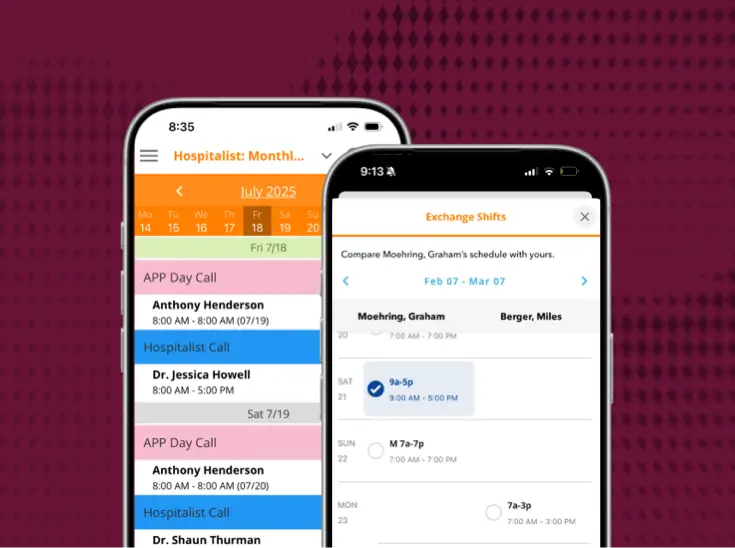
It's easier than ever to request schedule changes using PerfectServe Lightning Bolt Scheduling. The newly updated iOS app, available in the App Store now, streamlines the process of users submitting and administrators managing requests on-the-go. With the upcoming holiday season, this new iOS app feature will make planning your time away from work to recharge with family and friends more convenient.
We've also updated the way you make routine requests throughout the rest of the year. Using sophisticated technology to learn your most commonly selected assignments and request types, this currently mobile-only feature automatically displays frequently used requests first, bringing added efficiency by drastically decreasing the need to scroll through long lists of options.
In addition to new request functionality, we've also made some upgrades "under the hood." Most noticeably, the sleek new interface provides a universal experience for users across both iOS and Android devices. A consistent UI across platforms allows our product development team to more quickly deliver updates to both mobile apps, ensuring your healthcare operations has the latest mobile shift scheduling innovation.
Here's what else is new in the updated iOS app:
- View more of your schedule at once — up to a month at a time
- Easily search and filter long lists of schedule views by department
- Quickly swipe left and right to navigate between dates
- More easily read the schedule with improved grouping and display of views by assignment and by personnel
- Conveniently trade shifts with your colleagues
- Quickly contact a provider by tapping their name directly on the schedule
- View and submit extended notes along with your requests
- Take advantage of optional single sign-on
As we continue to advance the way you can interact with your schedule on your mobile device, we want to hear from you. If you have suggestions for functionality you'd like to see in the iOS or Android app, reach out to us at featurerequests@lightning-bolt.com.
See it working for real teams






.jpg)




.png)







Bring us the workflow that [hurts most]
We'll show you how it runs on PerfectServe, with your teams, your sites and your EHR.